Corsair Xeneon Edge The Second Screen Built for Sim Rigs, Streaming, and Desktop Widgets
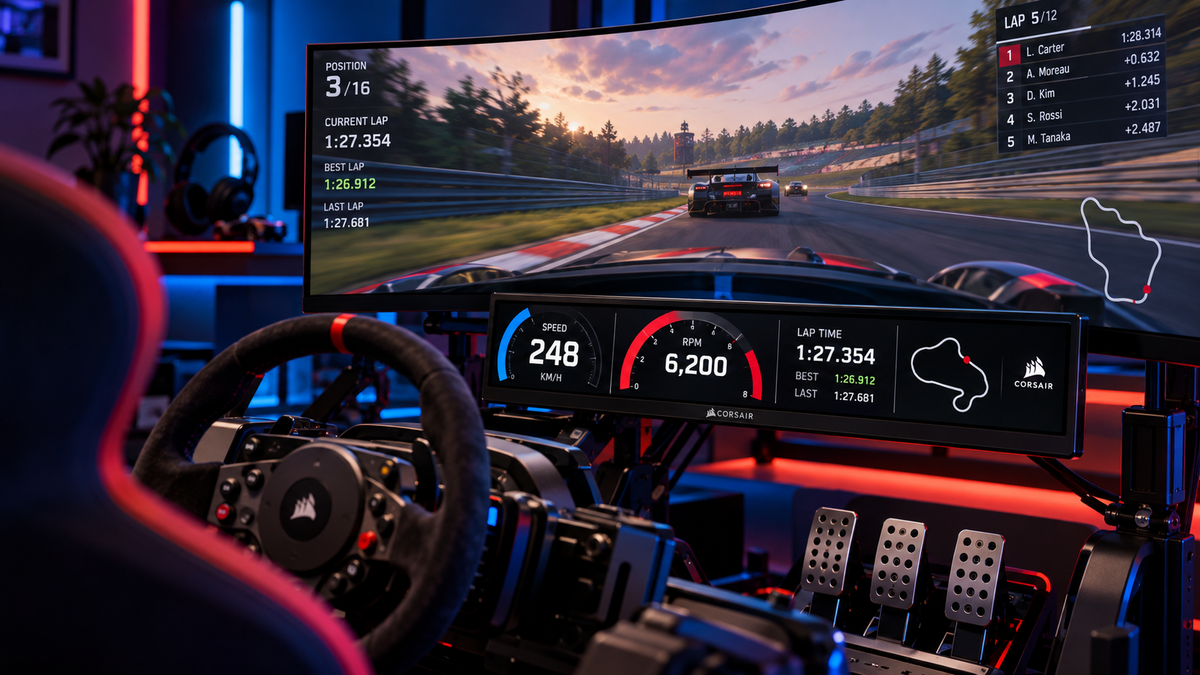
The Corsair Xeneon Edge is a 14.5-inch touchscreen monitor built as a compact second display not a replacement for your main screen, but an add-on for system stats, streaming overlays, sim-racing dashboards, and quick-access controls. It mounts to a desk, a tripod, or directly inside a PC case using built-in magnets, and works with or without Corsair's iCUE software.
What Is the Corsair Xeneon Edge?
It's a 14.5" AHVA panel (IPS-equivalent) running at 2560×720 a 32:9 ultrawide aspect ratio with a 60Hz refresh rate, 350 cd/m² brightness, and 16.7 million colours. There's no HDR support, which makes sense given what the screen is actually for: displaying data and controls, not watching video.
It connects over HDMI 2.0 or USB-C with DisplayPort Alt Mode a single USB-C cable can carry both video and power. The 5-point capacitive touchscreen means every widget, overlay, and shortcut is tap-controlled. It weighs 1.674kg, measures 372 × 120 × 22mm, comes in black or white, and is backed by a 3-year Corsair warranty.
Full Specs at a Glance
|
Spec |
Detail |
|
Screen size |
14.5" |
|
Resolution |
2560 × 720 (32:9 ultrawide) |
|
Panel type |
AHVA (IPS-equivalent) |
|
Refresh rate |
60Hz |
|
Brightness |
350 cd/m² |
|
Touch |
5-point capacitive multi-touch |
|
Connectivity |
HDMI 2.0, USB-C (DP Alt Mode) |
|
Mounting |
Magnetic desktop stand, 14 built-in magnets, dual ¼-20" threaded mounts, 360mm radiator mount compatible |
|
Software |
Corsair iCUE (Windows); standalone display mode on macOS |
|
Weight |
1.674kg |
|
Colours |
Black, White |
|
Warranty |
3 years |
Who Actually Needs One?
- Sim racers who want telemetry and dashboard data visible without adding a third full monitor
- Streamers who want chat, alerts, or stream controls visible without cluttering their main display
- Anyone tight on desk space who still wants CPU/GPU temps and clock speeds visible at a glance
- PC builders who want an always-visible display mounted inside or on the case itself, not just on the desk
What You Get With iCUE (and What You Don't)
With Corsair's iCUE software installed, the Xeneon Edge unlocks customisable widgets system stats, media controls, weather, calendar touch shortcuts, and compatibility with Elgato's Virtual Stream Deck. Without iCUE, or on macOS, it still works as a plain secondary display: plug it in over HDMI or USB-C and it just shows up, no software required.
Two things worth knowing before you buy: there are no physical buttons, so every adjustment goes through software, and it can't run alongside fullscreen Windows applications.
The Honest Pros and Cons
Pros:
- Sharp for its size around 183 pixels per inch
- Genuinely flexible mounting: desk, PC case, tripod, or radiator
- Adds a second display without the desk space or cost of a full monitor
- Solid build quality backed by a 3-year warranty
Cons:
- Glossy screen picks up glare in bright rooms
- The included stand is serviceable but offers limited viewing-angle adjustment
- No physical buttons you're reliant on software for everything
- The 32:9 ultrawide shape is built for widgets and overlays, not general productivity work
Frequently Asked Questions
What is the Corsair Xeneon Edge used for?
It's a secondary touchscreen display for system stats, streaming overlays, sim-racing telemetry, or quick-access controls not a replacement for a primary monitor.
Does the Corsair Xeneon Edge work without iCUE?
Yes. It works as a standard secondary monitor over HDMI or USB-C with no Corsair software installed, though you'll need iCUE to unlock the customisable widgets and touch shortcuts.
Can I mount the Xeneon Edge inside my PC case?
Yes it has 14 built-in magnets that let it attach to any steel surface, including directly inside a case, plus two ¼-20" threaded mounts for tripods or monitor arms.
Does the Corsair Xeneon Edge work on Mac?
It works on macOS as a basic secondary display, but Corsair's iCUE software and the widgets and touch features that come with it is Windows-only.
Is the Corsair Xeneon Edge worth it?
For sim racers, streamers, and anyone who wants always-on system stats without the cost or desk space of a second full monitor, yes. If you need a general-purpose productivity display, a standard monitor is the better fit.
Hyetech supplies and supports business IT across Victoria, with stores in Narre Warren, Chadstone and Richmond.