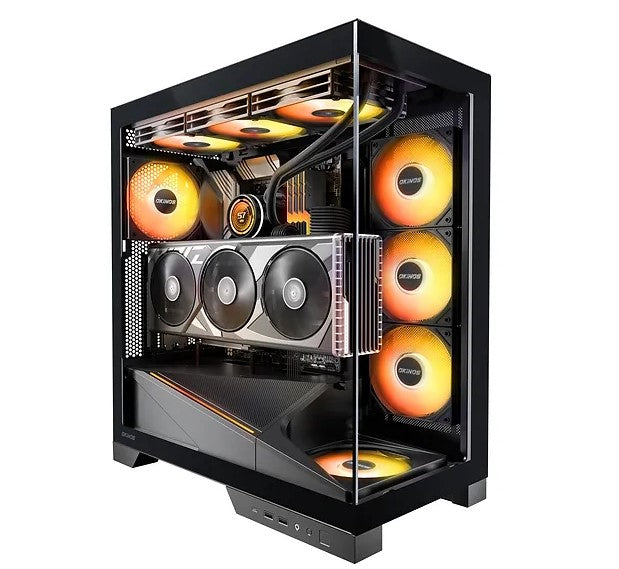
OKINOS AQ9 ARGB Mid Tower PC Case with 5x120mm Fans
OKINOS AQ9 ARGB Mid Tower PC Case with 5x120mm Fans
SKU:CAO-AQ9ARGB
The OKINOS AQ9 ARGB is an ATX mid tower case designed for gaming and high-performance builds. Featuring a 270° panoramic tempered glass view, pre-installed 5x120mm ARGB PWM fans, and Type-C 3.2 Gen 2 connectivity, it delivers superior cooling and stunning aesthetics for PC enthusiasts.
Couldn't load pickup availability
- See our return policy
- 12 months Manufacturer Warranty
Product Information
| Brand | OKINOS |
|---|---|
| Category | Cases & Accessories |
| SKU | CAO-AQ9ARGB |
| Availability | Out of Stock |

Overview
- The OKINOS AQ9 ARGB is a premium ATX mid tower case built for gamers and PC enthusiasts who demand both performance and visual impact. The distinctive 270° panoramic tempered glass design provides an immersive view of your hardware, while the pre-installed 5x120mm ARGB PWM fans deliver 260 CFM of cooling power with motherboard-sync lighting capabilities.
Designed for flexibility, the case supports dual 360mm radiators, making it ideal for custom liquid cooling builds. The inclined power supply shroud enhances both airflow efficiency and visual aesthetics, whilst the 41mm rear cable management space ensures clean, professional-looking builds. Full-size dust filters on the top and bottom simplify maintenance without compromising cooling performance.
The front panel includes modern connectivity options: one Type-C 3.2 Gen 2 (10Gbps) port, two USB 3.0 ports, audio jacks, and dedicated ARGB fan control buttons for easy lighting customisation. Tool-free tempered glass panels and strategically positioned fixing slots make hardware assembly and upgrades straightforward, even for complex custom builds.
Specifications
| Brand | OKINOS |
|---|---|
| Model | AQ9 ARGB |
| Product Type | ATX Mid Tower PC Case |
| Dimensions | 453 x 232 x 518mm (D x W x H) |
| Weight | 22kg (burst test weight), 18kg (EPE weight) |
| Front Panel Ports | Type-C 3.2 Gen 2 (10Gbps) x1, USB 3.0 x2, Audio jacks |
| Pre-Installed Fans | 5x 120mm H12 PWM ARGB (4x reverse configuration, 1x standard) |
| Fan Controller | 5-port ARGB PWM fan controller |
| Total Airflow | 260 CFM |
| Radiator Support | Dual 360mm radiators (top and right-side mounting) |
| Cable Management Space | 41mm rear cable routing area |
| Front Panel Design | 270° panoramic tempered glass |
| Side Panel | Tempered glass with tool-free removal |
| Dust Filters | Full-size removable filters (top and bottom) |
| Power Supply Shroud | Inclined design with ARGB lighting |
| Lighting Features | ARGB lighting strip, motherboard-sync capable |
| Warranty | 12 months |
Key Features
Ideal For
FAQs
Does the AQ9 ARGB include fans?
Yes, the case comes pre-installed with 5x120mm ARGB PWM fans that deliver 260 CFM of total airflow. It also includes a 5-port ARGB PWM fan controller for motherboard synchronisation.
Can I install liquid cooling in this case?
Yes, the AQ9 ARGB supports dual 360mm radiators. You can mount one on top and one on the right side. Note that when installing both simultaneously, the right-side radiator tubes should be positioned facing downwards.
What ports are available on the front panel?
The front panel features one Type-C 3.2 Gen 2 (10Gbps) port, two USB 3.0 ports, audio jacks, a power switch with start/restart functions, and ARGB fan control buttons.
Is the tempered glass easy to remove?
Yes, both the front and left tempered glass panels feature tool-free removal with fixing slots and studs, making hardware assembly and cleaning straightforward.
How do dust filters work in this case?
Full-size removable dust filters are installed on the top and bottom of the case. They can be easily removed and cleaned to prevent dust accumulation whilst maintaining optimal airflow.
Can the ARGB lighting sync with my motherboard?
Yes, the pre-installed ARGB fans support motherboard-sync lighting effects via the included 5+5 PWM ARGB fan controller. Dedicated ARGB control buttons are also available on the front panel for manual customisation.
How much space is available for cable management?
The case provides 41mm of rear cable routing space and features a back-connect motherboard design. This allows you to route cables from behind the motherboard tray for cleaner front aesthetics and improved airflow.