HP P34hc G4 34" Curved Ultrawide Monitor WQHD
HP P34hc G4 34" Curved Ultrawide Monitor WQHD
SKU:MNHP-P34HCG4
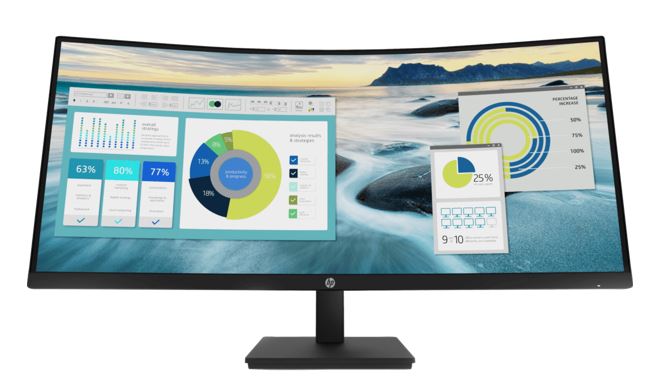
The HP P34hc G4 is a 34-inch curved ultrawide monitor designed for professionals requiring extended workspace. Featuring WQHD 3440 × 1440 resolution, USB-C with 65W power delivery, and height-adjustable stand, it delivers exceptional productivity gains for finance, design, and data analysis teams.
Couldn't load pickup availability
- See our return policy
- 3-year labour limited warranty Manufacturer Warranty
Product Information
| Brand | HP |
|---|---|
| Category | Monitors |
| SKU | MNHP-P34HCG4 |
| Availability | In Stock |

Overview
- The HP P34hc G4 is a premium 34-inch curved ultrawide monitor purpose-built for knowledge workers and creative professionals. Its 21:9 aspect ratio and 3440 × 1440 WQHD resolution provide the equivalent workspace of two traditional 16:9 displays side-by-side, eliminating the need for multiple screens and reducing cable clutter.
The curved VA panel is engineered for both productivity and comfort. The 250-nit brightness, 3500:1 contrast ratio, and TÜV-certified low blue light technology ensure clear, comfortable viewing during extended work sessions. The 5ms response time supports smooth scrolling and dynamic content without ghosting.
Connectivity is comprehensive and modern. The integrated USB-C connection supports both DisplayPort 1.2 video input and up to 65W power delivery, allowing a single cable to both display content and charge compatible laptops. Additional DisplayPort and HDMI inputs, combined with four USB 3.2 Gen 1 ports, provide flexible peripheral management.
Ergonomics are a priority. The height-adjustable stand (100 mm range) and tilt functionality (-5° to +21°) accommodate various desk setups and user preferences. At 10.51 kg with a well-designed stand, the display is stable yet relatively portable for a screen of this size. The 3-year labour limited warranty provides confidence in long-term reliability.
Specifications
| Display Type | VA panel |
|---|---|
| Screen Size | 34 inches |
| Native Resolution | 3440 × 1440 (WQHD) |
| Aspect Ratio | 21:9 |
| Brightness | 250 nits |
| Contrast Ratio | 3500:1 |
| Response Time | 5 ms (GtG with overdrive) |
| Pixel Pitch | 0.231 mm |
| Display Area | 33.37 × 79.72 cm |
| Colour Technology | Low blue light (TÜV certified) |
| Flicker-Free | Yes |
| Anti-Glare Coating | Yes |
| Refresh Rate | 60 Hz |
| Horizontal Scan Frequency | 30–160 kHz |
| Vertical Scan Frequency | 48–100 Hz |
| Supported Resolutions | 640 × 480, 800 × 600, 1024 × 768, 1280 × 720, 1280 × 800, 1280 × 1024, 1440 × 900, 1600 × 900, 1680 × 1050, 1920 × 1080, 1920 × 1200, 3440 × 1440, 3440 × 440 |
| USB-C Input | DisplayPort 1.2 (Alt Mode) with up to 65W power delivery |
| DisplayPort Input | 1 × DisplayPort 1.2 (with HDCP support) |
| HDMI Input | 1 × HDMI 2.0 (with HDCP support) |
| USB Input | 1 × USB Type-B, 4 × USB 3.2 Gen 1 Type-A |
| Integrated Webcam | No |
| VESA Mount | 100 × 100 mm |
| Tilt Adjustment | -5° to +21° |
| Swivel | No |
| Pivot | No |
| Height Adjustment | 100 mm range |
| Dimensions (without stand) | 80.94 × 11.21 × 36.69 cm (W × D × H) |
| Dimensions (with stand) | 80.94 × 23.49 × 51.8 cm (W × D × H) |
| Weight | 10.51 kg |
| Power Supply | 100–240 VAC, 50/60 Hz |
| Maximum Power Consumption | 190 W |
| Typical Power Consumption | 48 W |
| Standby Power Consumption | 0.5 W |
| Operating Temperature Range | 5–35 °C |
| Warranty | 3-year labour limited warranty |
| Manufacturer SKU | 21Y56AA |
Key Features
Ideal For
FAQs
Is the USB-C connection suitable for charging my laptop?
Yes, the USB-C input supports power delivery up to 65W, allowing you to charge compatible laptops while simultaneously displaying content from a single cable.
Can I use this monitor with VESA wall mounting?
Yes, the monitor has a 100 × 100 mm VESA mount pattern. However, you will need a separate VESA arm or bracket, as the display comes with a standard stand.
Does the curved design reduce image distortion at the edges?
The curved VA panel is designed to maintain consistent viewing angles and reduce image distortion across the 34-inch width, creating a more immersive and comfortable viewing experience.
What makes the low blue light feature beneficial?
The TÜV-certified low blue light mode reduces blue light emission, which can contribute to eye strain during extended work sessions. This is particularly useful for professionals working long hours.
How many external devices can I connect via USB?
The monitor includes four USB 3.2 Gen 1 Type-A ports for connecting peripherals such as keyboards, mice, external hard drives, and other USB devices.
What video input options are available?
The monitor supports USB-C with DisplayPort 1.2 Alt Mode, a dedicated DisplayPort 1.2 input, and HDMI 2.0. This provides flexible connectivity with modern laptops, desktops, and graphics workstations.
Is height adjustment available to prevent neck strain?
Yes, the height-adjustable stand offers 100 mm of vertical adjustment, combined with tilt functionality (-5° to +21°) to accommodate different desk setups and ergonomic preferences.