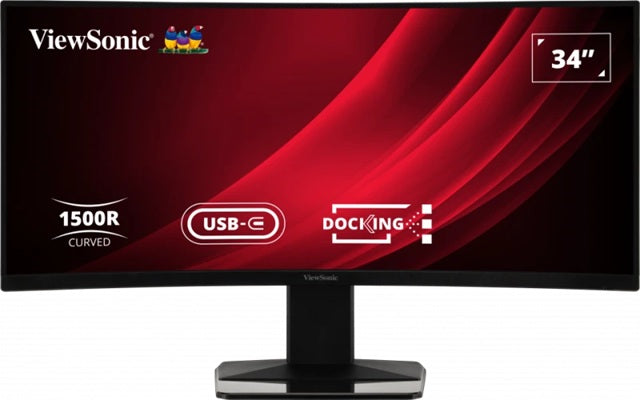
ViewSonic VG3419C 34" Curved Ultrawide Docking Monitor
ViewSonic VG3419C 34" Curved Ultrawide Docking Monitor
SKU:MNV-VG3419C-2
The ViewSonic VG3419C is a 34-inch curved ultrawide docking monitor designed for productivity and multitasking professionals. Featuring UWQHD resolution, integrated USB-C docking with 65W charging, built-in KVM switch, and 120Hz refresh rate, it streamlines connectivity and cable management for demanding workflows.
Couldn't load pickup availability
- See our return policy
- 60 months Manufacturer Warranty
Product Information
| Brand | ViewSonic |
|---|---|
| Category | Monitors |
| SKU | MNV-VG3419C-2 |
| Availability | In Stock |

Overview
- The ViewSonic VG3419C transforms productivity with a sprawling 34-inch curved ultrawide display delivering stunning UWQHD resolution (3440×1440). Its immersive 1500R curved design pulls content into your field of vision, reducing eye strain during extended work sessions. The integrated docking station eliminates cable chaos—a single USB-C connection delivers 65W of power charging, data transfer, and Gigabit Ethernet connectivity, making this monitor the hub of your desk rather than just a display.
Built-in KVM functionality lets you control multiple computers from one keyboard and mouse, ideal for professionals juggling development machines, trading terminals, or server management. The 120Hz refresh rate with AMD FreeSync Premium ensures fluid responsiveness for both work and occasional gaming, whilst the 178° viewing angles and HDR10 support guarantee colour-accurate content creation. VA panel technology delivers 4000:1 contrast ratio and 121% sRGB gamut coverage, meeting professional colour standards.
Ergonomic flexibility through height adjustment and -3.5° to 23° tilt keeps you comfortable throughout the day. With 60-month warranty coverage, this is a long-term investment in workspace efficiency for Australian IT professionals and knowledge workers.
Specifications
| Display Size | 34 inches |
|---|---|
| Display Type | Curved LCD with VA panel |
| Resolution | 3440 × 1440 pixels |
| Resolution Type | UWQHD (Ultra-Wide QHD) |
| Aspect Ratio | 21:9 |
| Curvature | 1500R |
| Refresh Rate | 120 Hz |
| Response Time (GTG) | 3.5 ms |
| Response Time (MPRT) | 0.4 ms |
| Panel Brightness | 300 cd/m² (typical) |
| Contrast Ratio (Static) | 4000:1 (typical) |
| Contrast Ratio (Dynamic) | 80M:1 |
| Colour Depth | 8-bit true colour, 16.7 million colours |
| sRGB Gamut | 121% (typical) |
| NTSC Gamut | 85% (typical) |
| High Dynamic Range | HDR10 |
| Viewing Angles | 178° horizontal, 178° vertical |
| Surface Treatment | Anti-glare, hard coating (3H) |
| Low Blue Light | Software solution |
| Flicker-Free | Yes |
| Backlight Life | 30000 hours (minimum) |
| Pixel Size | 0.232 mm (H) × 0.232 mm (V) |
| Variable Refresh Rate | AMD FreeSync Premium |
| USB 3.2 Type-A Ports | 3 (downstream) |
| USB 3.2 Type-B Port | 1 (upstream) |
| USB Type-C Port | 1 with DisplayPort Alt mode and 65W power delivery |
| HDMI Port | 1 (HDMI 2.0) |
| DisplayPort | 1 |
| Audio Output | 3.5 mm jack (1) |
| Ethernet Port | 1 (Gigabit RJ45) |
| Power Input | 3-pin socket (IEC C14 / CEE22) |
| PC Maximum Resolution | 3440 × 1440 |
| Mac Maximum Resolution | 3440 × 1440 |
| Windows Certification | Windows 10/11 certified |
| macOS Support | Tested |
| KVM Switch | Built-in |
| Height Adjustment | Yes |
| Tilt Adjustment | -3.5° to 23° |
| Warranty | 60 months |
Key Features
Ideal For
FAQs
What is the benefit of a 21:9 ultrawide screen for work?
A 21:9 ultrawide display provides the horizontal space of approximately two standard 16:9 monitors side-by-side, reducing bezel clutter and allowing you to view multiple applications simultaneously without switching windows. This is ideal for financial analysis, coding, design, and content creation workflows.
How does the USB-C docking feature simplify my desk setup?
The USB-C connection consolidates charging, data transfer, and Ethernet into a single cable. Rather than connecting multiple peripherals and power adapters, you dock your laptop once and gain access to all downstream USB ports, your network, and full power delivery (65W), dramatically reducing cable clutter.
What is a KVM switch and how does it help?
KVM (Keyboard, Video, Mouse) switching allows you to control multiple computers using a single keyboard, mouse, and monitor. Simply toggle between connected systems to access your development machine, trading terminal, or server without physically swapping cables or peripherals.
Is the VG3419C suitable for colour-critical work?
Yes. The VA panel delivers 4000:1 contrast ratio and covers 121% of the sRGB colour space, meeting professional standards for photo editing, video grading, and graphic design. The HDR10 support further enhances dynamic range for content creation workflows.
Does the curved panel reduce eye strain?
The 1500R curvature brings the screen edges closer to your eyes, reducing the distance your eyes must focus across and minimising neck rotation. Combined with the anti-glare coating and flicker-free technology, this supports comfort during extended work sessions.
What operating systems are compatible?
The VG3419C is certified for Windows 10 and 11, and has been tested with macOS. It supports both PC and Mac at full UWQHD resolution (3440 × 1440).
What is the warranty coverage?
The ViewSonic VG3419C includes a comprehensive 60-month (5-year) manufacturer warranty, providing long-term protection for your investment.