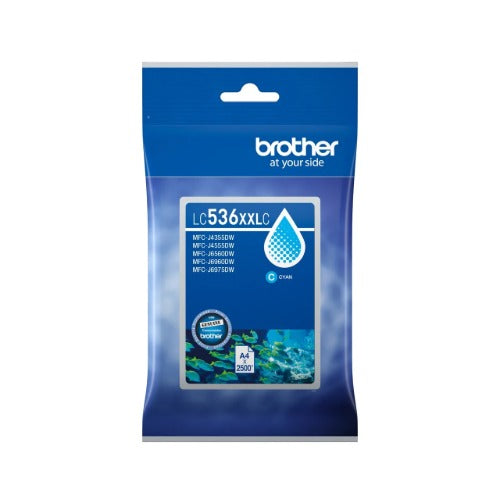
Brother LC-536XXLC Cyan Ink Cartridge
Brother LC-536XXLC Cyan Ink Cartridge
SKU:COB-LC-536XXLC
Couldn't load pickup availability
- See our return policy
- 12 months Manufacturer Warranty
Product Information
| Brand | Brother |
|---|---|
| Category | Printer Consumable |
| SKU | COB-LC-536XXLC |
| Availability | In Stock |

Overview
- The Brother LC-536XXLC is a genuine cyan ink cartridge engineered for high-capacity printing on Brother multifunction devices. With a yield of up to 2500 pages, this XL format cartridge reduces replacement frequency and lowers per-page printing costs for Australian businesses.
Designed for the MFC-J4355DW, MFC-J4555DW, and MFC-J6560DW series, it delivers consistent cyan colour output for professional documents, marketing materials, and everyday office printing. The cartridge integrates seamlessly with compatible Brother printers without requiring driver updates or configuration changes.
Backed by a 12-month warranty, this genuine consumable ensures reliable performance and colour fidelity. High-volume users benefit from extended print runs and reduced downtime associated with frequent cartridge changes.
Specifications
| Brand | Brother |
|---|---|
| Model | LC-536XXLC |
| Cartridge Type | Cyan Ink |
| Format | XL (High Capacity) |
| Page Yield | Up to 2500 pages |
| Compatible Printers | MFC-J4355DW, MFC-J4555DW, MFC-J6560DW |
| Warranty | 12 months |
Key Features
Ideal For
FAQs
What is the page yield for the Brother LC-536XXLC cartridge?
The LC-536XXLC cyan cartridge delivers up to 2500 pages of colour printing, making it a high-capacity option that reduces replacement frequency.
Which Brother printers is this cartridge compatible with?
This cartridge is designed for the Brother MFC-J4355DW, MFC-J4555DW, and MFC-J6560DW multifunction printer models.
Is this a genuine Brother cartridge?
Yes, this is a genuine Brother LC-536XXLC cartridge manufactured by Brother Industries.
What warranty is included with this cartridge?
The Brother LC-536XXLC includes a 12-month manufacturer's warranty covering defects in materials and workmanship.
How do I install the LC-536XXLC cartridge?
Installation is straightforward—open your printer's cartridge access cover, remove the old cyan cartridge, and insert the new LC-536XXLC until it clicks into place. Refer to your printer's user manual for detailed instructions.
Will using this cartridge void my printer warranty?
No. Using genuine Brother cartridges does not void your printer warranty. Always ensure you purchase authentic Brother consumables from authorised suppliers.
How should I store unused cartridges?
Store cartridges in a cool, dry place away from direct sunlight. Keep them in their original sealed packaging until ready to use to prevent ink from drying out.