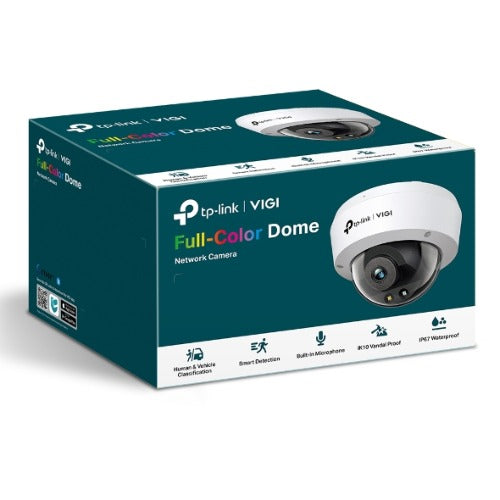
TP-Link VIGI C240 4MP Full-Color Dome Network Camera
TP-Link VIGI C240 4MP Full-Color Dome Network Camera
SKU:NWTL-VIGI-C240-2.8
The TP-Link VIGI C240 is a 4MP full-colour dome network camera designed for 24-hour surveillance in any lighting condition. Featuring smart detection, human and vehicle classification, and vandal-proof construction, it delivers reliable security coverage for businesses and facilities.
Couldn't load pickup availability
- See our return policy
- 36 months Manufacturer Warranty
Product Information
| Brand | TP-LINK |
|---|---|
| Category | Security and Surveillance |
| SKU | NWTL-VIGI-C240-2.8 |
| Availability | In Stock |

Overview
- The TP-Link VIGI C240 is a professional-grade 4MP dome camera built for round-the-clock security in demanding environments. Its 24-hour full-colour capability with supplemental lighting ensures clear footage regardless of lighting conditions, whilst intelligent detection features reduce false alarms by distinguishing between humans, vehicles, and other objects.
Designed with durability in mind, the camera combines IK10 vandal-resistant housing with IP67 waterproof protection, making it ideal for outdoor deployments and high-risk areas. Its H.265+ compression technology optimises bandwidth and storage without compromising image quality, lowering operational costs for larger surveillance systems.
Flexible management options—web UI, NVR UI, VIGI app, and VIGI Security Manager—give IT teams and security managers full control over their installations. With support for both PoE and 12V DC power, SD card storage up to 256GB, and a built-in microphone, the C240 delivers a complete surveillance solution for Australian businesses seeking reliable, professional-grade security.
Specifications
| Resolution | 4MP (2688 × 1512) |
|---|---|
| Lens | 2.8mm fixed lens |
| Sensor Type | High-sensitivity sensor |
| 24-Hour Full-Colour | Yes, with supplemental lights |
| Video Compression | H.265+ |
| Smart Detection | Boundary crossing, area entry, camera obstruction, object removal/abandonment |
| Object Classification | Human and vehicle detection |
| Vandal Resistance | IK10 rated |
| Waterproof Rating | IP67 |
| Built-In Microphone | Yes, 15-foot recording radius |
| Video Enhancement | Smart IR, WDR (Wide Dynamic Range), 3D DNR (Digital Noise Reduction), Night Vision |
| Power Supply Options | PoE (Power over Ethernet) and 12V DC |
| Storage | SD card slot (up to 256GB) |
| Management Methods | Web UI, NVR UI, VIGI app, VIGI Security Manager |
| Warranty | 36 months |
Key Features
Ideal For
FAQs
What is H.265+ compression and why does it matter?
H.265+ is an advanced video codec that compresses footage more efficiently than standard H.264, reducing bandwidth and storage requirements by up to 50% without sacrificing image quality. This lowers network load and reduces monitoring costs, especially important for multi-camera installations.
Can the VIGI C240 work in complete darkness?
Yes. The camera features 24-hour full-colour capability with supplemental lights and a high-sensitivity sensor, enabling clear colour footage even in pitch-black conditions without relying on night vision mode.
What power options are available?
The camera supports both PoE (Power over Ethernet) and 12V DC power supply, offering flexibility in installation and reducing wiring complexity.
How is the VIGI C240 protected against vandalism?
The camera has IK10 vandal-resistant housing, designed to withstand physical impacts and tampering attempts. It also features IP67 waterproofing for protection against dust and harsh weather.
Can I store footage locally on the camera?
Yes. The camera includes an SD card slot supporting up to 256GB of local storage, enabling continuous recording and backup independent of network connectivity.
What is smart detection and how does it reduce false alarms?
Smart detection uses AI-powered object classification to distinguish between humans, vehicles, and other objects. This delivers more accurate alerts and reduces nuisance notifications from animals, shadows, or weather events.
How do I manage multiple VIGI cameras across my business?
TP-Link offers four management methods: web UI for direct access, NVR UI for integrated systems, the VIGI mobile app for on-the-go monitoring, and VIGI Security Manager for centralised multi-site management.