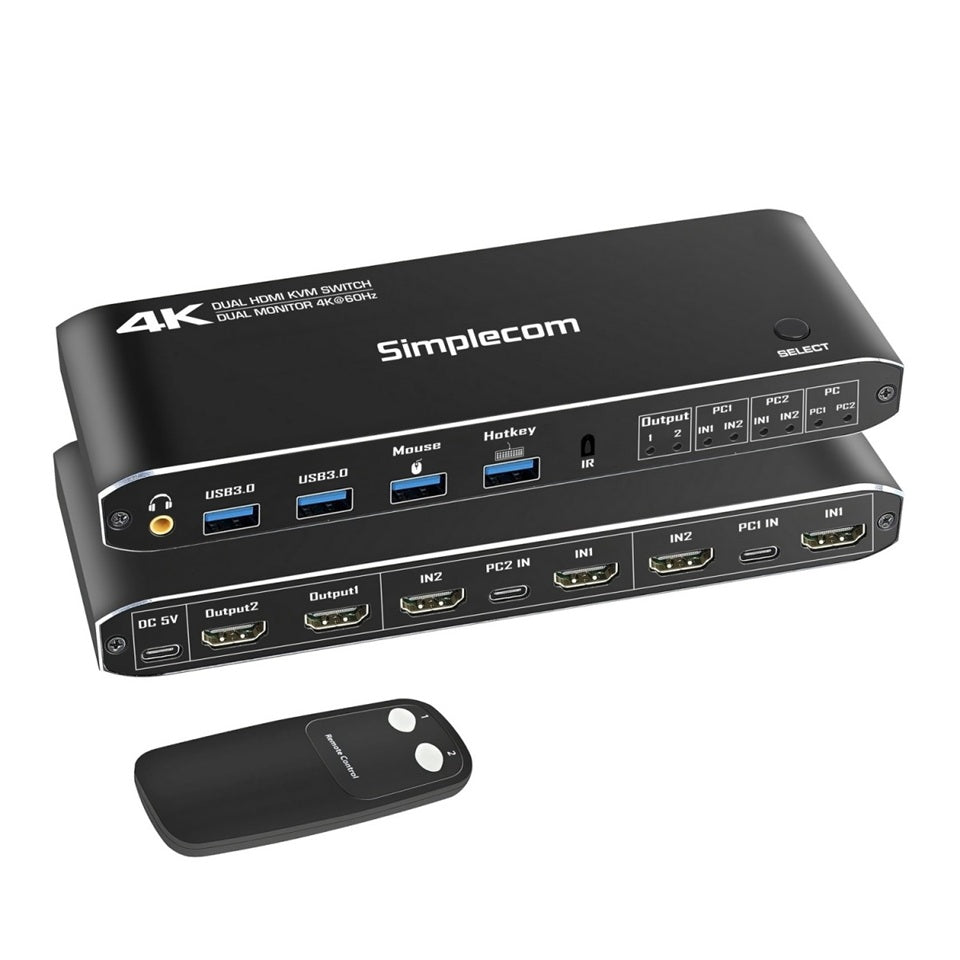
Simplecom KM430 Dual HDMI KVM Switch with USB Hub
Simplecom KM430 Dual HDMI KVM Switch with USB Hub
SKU:HXSI-KM430
Couldn't load pickup availability
- See our return policy
- 12 months Manufacturer Warranty
Product Information
| Brand | Simplecom |
|---|---|
| Category | Notebook Accessories |
| SKU | HXSI-KM430 |
| Availability | In Stock |

Overview
- The Simplecom KM430 is a professional-grade KVM switch that consolidates control of two computers into a single keyboard, mouse, and dual-monitor setup. It supports extended and mirrored display modes with HDMI 2.0 compliance, enabling 4K resolution at 60Hz on both screens simultaneously. The integrated 4-port USB hub switches along with the video feeds, allowing seamless transition between computers without unplugging peripherals.
Switching between computers is intuitive, offering three methods: a dedicated front-panel button, included remote control, or keyboard hotkeys via the dedicated USB port. The KVM is powered entirely via USB connection to your computers—no external power adapter required (though a backup DC 5V port is available if needed).
Built with a durable aluminium alloy chassis, the KM430 operates silently and efficiently across Windows, macOS, Linux, and Chrome OS platforms. It's ideal for professionals who need to maximise productivity across multiple systems without the expense and clutter of duplicate peripherals.
Specifications
| Model | KM430 |
|---|---|
| USB Upstream Ports | 2× USB-C (PC1 and PC2) |
| USB Downstream Ports | 2× USB 3.0 SuperSpeed, 2× USB 2.0 (keyboard and mouse) |
| HDMI Inputs | 4× HDMI 2.0 (2 per computer) |
| HDMI Outputs | 2× HDMI 2.0 (for 2 displays) |
| Audio Output | 3.5mm jack (extracted from HDMI Output 1) |
| Power Input | USB-C or DC 5V (backup only) |
| USB 3.0 Bandwidth | Up to 5 Gbps per port |
| USB 2.0 Bandwidth | Up to 480 Mbps per port |
| Video Bandwidth | Up to 18 Gbps |
| Maximum Video Resolution | 4K@60Hz (3840×2160), 2K@120Hz (2560×1440), 1080p@144Hz (1920×1080) |
| Maximum Cable Length | 5 metres (input/output) |
| Operating Temperature | -5°C to 45°C |
| Operating Humidity | 5% to 90% RH (non-condensing) |
| Dimensions | 175mm (L) × 57mm (W) × 21mm (H) |
| Weight | 170 grams |
| Compatible Operating Systems | Windows, macOS, Linux, Chrome OS |
| Warranty | 12 months |
| Package Contents | KVM switch, 2× USB-C to USB-A cables (5Gbps), 1× USB-C to USB-A power cable, remote control |
Key Features
Ideal For
FAQs
Can I use the Simplecom KM430 with just one monitor?
Yes. The KM430 works in single-monitor mode if you only need one display. You can still control two computers and switch USB peripherals seamlessly.
Does the KM430 require an external power adapter?
No. The KVM is powered via USB connection to your computers. A DC 5V backup port is included for situations where a computer's USB port cannot supply sufficient power.
What video resolutions are supported?
The KM430 supports 4K@60Hz (3840×2160), 2K@120Hz (2560×1440), and 1080p@144Hz (1920×1080). It complies with HDMI 2.0 standards.
How do I switch between computers?
You can switch between computers using the front-panel toggle button, included remote control, or keyboard hotkeys (when connected via the dedicated USB keyboard port).
Will my USB peripherals switch automatically?
Yes. The integrated 4-port USB hub switches together with the video inputs, so all connected USB devices (keyboard, mouse, external drives) switch simultaneously when you change computers.
What cables are included in the package?
The package includes two USB-C to USB-A data cables (5Gbps), one USB-C to USB-A power cable, and a remote control. HDMI cables are not included and should support 18Gbps bandwidth for optimal performance.
Is driver installation required?
No. The KM430 is plug-and-play and works seamlessly across Windows, macOS, Linux, and Chrome OS without drivers.
What is the maximum cable length for HDMI and USB connections?
The maximum recommended cable length for both input and output connections is 5 metres for stable performance.