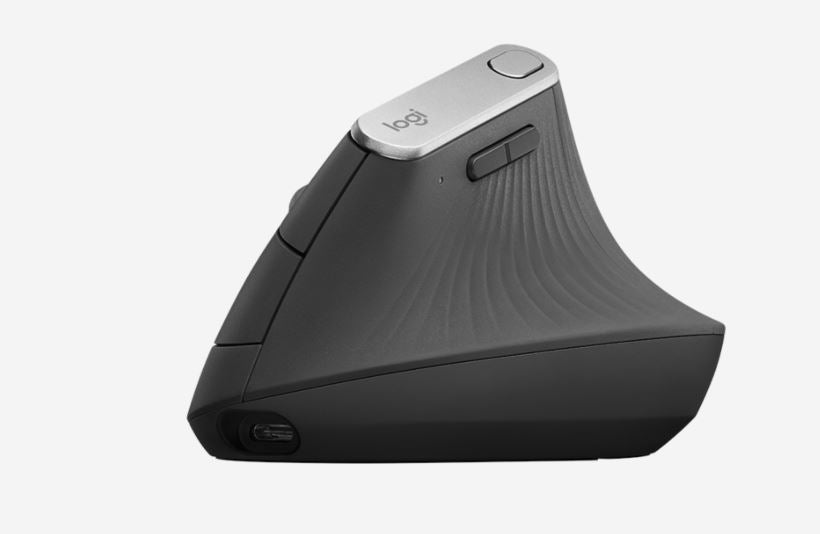
Logitech MX Vertical Ergonomic Mouse
Logitech MX Vertical Ergonomic Mouse
SKU:MILT-MXVERTICAL
The Logitech MX Vertical is an advanced ergonomic mouse designed to reduce wrist strain during extended work sessions. Featuring a 65-degree vertical design, customisable buttons, and multi-device connectivity, it delivers comfort and precision for professionals who spend hours at the keyboard.
Couldn't load pickup availability
- See our return policy
- 12 months Manufacturer Warranty
Product Information
| Brand | Logitech |
|---|---|
| Category | Mouse |
| SKU | MILT-MXVERTICAL |
| Availability | In Stock |

Overview
- The Logitech MX Vertical is an advanced ergonomic mouse engineered to provide next-level comfort during extended computing sessions. Its distinctive 65-degree vertical design naturally aligns your wrist to reduce strain and fatigue, making it an ideal choice for professionals who spend significant time at their desk.
The mouse delivers precision and control through its advanced sensor technology, supporting adjustable DPI from 400 to 4000, allowing you to customise sensitivity to suit your workflow. Four customisable buttons enable quick access to frequently used functions, whilst the precision scroll wheel provides smooth, efficient navigation through documents and spreadsheets.
Connectivity is flexible and seamless across your device ecosystem. Choose between Logitech's Unifying Receiver, Bluetooth low energy, or USB-C connectivity—all three are supported on the same mouse. The rechargeable battery provides extended usage between charges, eliminating the need for constant battery replacement.
Whether you're a designer, developer, office manager, or knowledge worker, the MX Vertical combines ergonomic design with professional-grade functionality to support your productivity and wellbeing.
Specifications
| Connectivity Options | Unifying Receiver, Bluetooth Low Energy, USB-C |
|---|---|
| Sensor DPI | 400–4000 DPI (increments of 50 DPI) |
| Default DPI | 1000–1600 DPI |
| Buttons | 4 customisable buttons (Back, Forward, DPI, Middle click by default) |
| Scroll Wheel | Precision scroll wheel |
| Battery Type | Rechargeable Li-Po (240 mAh) |
| Wireless Range | 10 metres |
| Operating Systems Supported | Windows 7, 8, 10 or later; macOS 10.13.6 or later |
| Required Hardware | Available USB port (for Unifying Receiver or USB-C); Bluetooth low energy capability (for Bluetooth mode) |
| Software | Logitech Options (optional for customisation) |
| Warranty | 12 months |
Key Features
Ideal For
FAQs
How does the vertical design reduce wrist strain?
The 65-degree vertical orientation naturally aligns your wrist and forearm, reducing the pronation (inward rotation) that occurs with traditional flat mice. This neutral positioning minimises tension on tendons and muscles, helping to prevent fatigue and repetitive strain injuries during long work sessions.
Can I use the MX Vertical with multiple devices?
Yes. The MX Vertical supports three connectivity options: Unifying Receiver, Bluetooth Low Energy, and USB-C. You can pair it with multiple devices using Bluetooth and switch between them seamlessly, making it ideal for multi-device workflows.
How long does the battery last?
The rechargeable Li-Po battery (240 mAh) provides extended battery life. A full charge typically lasts up to 40 days of regular use. Battery life depends on usage patterns and DPI settings.
Is the DPI adjustable?
Yes. The sensor supports DPI adjustment from 400 to 4000 in increments of 50 DPI. You can adjust sensitivity on the fly using one of the customisable buttons or through Logitech Options software.
What operating systems does the MX Vertical support?
The MX Vertical is compatible with Windows 7, 8, 10, and later, as well as macOS 10.13.6 and later. Compatibility requirements vary slightly depending on whether you use the Unifying Receiver, Bluetooth, or USB-C connection.
Can I customise the buttons?
Yes. The MX Vertical has 4 customisable buttons. By default, they are mapped to Back, Forward, DPI cycle, and Middle click. You can reprogram these using Logitech Options software to match your workflow.
Do I need to install software to use the mouse?
No. The MX Vertical works out of the box with standard mouse functionality on Windows and macOS. Logitech Options software is optional and allows you to customise buttons, adjust DPI, and access advanced features.
What is the wireless operating distance?
The MX Vertical has a 10-metre wireless operating distance when using Bluetooth or the Unifying Receiver, providing flexibility in how you position your mouse relative to your computer.