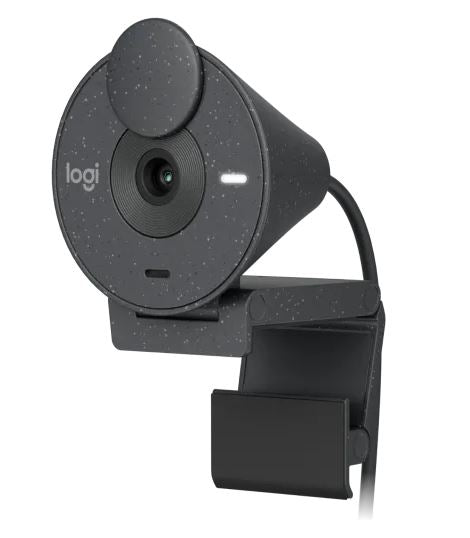
Logitech Brio 300 Full HD Webcam – Graphite
Logitech Brio 300 Full HD Webcam – Graphite
SKU:VILT-BRIO300-GRAPHIT
Couldn't load pickup availability
- See our return policy
- 1-Year Limited Hardware Warranty Manufacturer Warranty
Product Information
| Brand | Logitech |
|---|---|
| Category | Web Cams |
| SKU | VILT-BRIO300-GRAPHIT |
| Availability | In Stock |

Overview
- The Logitech Brio 300 is a straightforward, reliable 1080p webcam purpose-built for professional video communication. Its RightLight 2 technology automatically adjusts brightness and contrast to ensure you look your best regardless of office lighting conditions—a significant advantage for businesses where appearance and professionalism matter.
The integrated privacy shutter provides physical security assurance, while the built-in mono microphone eliminates the need for external audio equipment in most professional settings. USB-C connectivity ensures compatibility with modern laptops and desktops, and the compact form factor suits any workspace without clutter.
This webcam addresses the core needs of remote and hybrid teams: clear 1080p video, consistent auto-adjusting lighting, and reliable audio. It's not positioned as a high-end streaming camera, but rather as a dependable tool for daily business video calls where simplicity and consistent performance are valued over advanced features.
Specifications
| Video Resolution | 1920 x 1080 pixels (1080p) at 30fps; 1280 x 720 pixels (720p) at 30fps |
|---|---|
| Camera Megapixels | 2MP |
| Diagonal Field of View | 70° |
| Lens Type | Custom Logi 4 element lens with anti-reflective coating |
| Focus Type | Fixed focus |
| Digital Zoom | Supported |
| Hardware Zoom | 1x |
| Light Correction Technology | RightLight 2 auto light correction |
| Privacy Shutter | Yes—integrated |
| Microphone Type | Built-in mono microphone |
| Microphone Range | Up to 1.22 m |
| Connectivity | USB-C plug-and-play |
| Cable Length | 1.5 m |
| Height | 65.63 mm |
| Width | 53.1 mm |
| Depth | 45 mm |
| Weight | 74.6 g (including mount clip and cable) |
| Colour | Graphite |
| Material | 62% recycled plastic (graphite model) |
| Mount | Clip mount included |
| Software Support | Logi Tune compatible |
| Warranty | 1-Year Limited Hardware Warranty |
Key Features
Ideal For
FAQs
Does the Logitech Brio 300 require driver installation?
No. The Brio 300 uses USB-C plug-and-play connectivity, so it works immediately with Windows, macOS, and Linux systems without driver installation.
What is RightLight 2 and how does it help?
RightLight 2 is Logitech's automatic lighting correction technology. It balances brightness, adjusts contrast, and compensates for challenging light environments in real time, ensuring consistent, natural-looking video regardless of room lighting conditions.
Can I zoom in with the Brio 300?
The Brio 300 supports digital zoom via software, though it has 1x hardware zoom. For professional use, the fixed 70° field of view is designed to capture a natural view appropriate for video conferencing.
Is the privacy shutter hardware or software?
The privacy shutter is integrated and hardware-based, providing physical assurance that the camera is disabled when closed—no software can override it.
What is the microphone range and quality suitable for?
The built-in mono microphone has a range of 1.22 m and is designed for typical desk-based video calls in professional settings. For larger meeting rooms or open offices, an external microphone may be preferred.
Which devices and platforms are compatible?
The Brio 300 is compatible with Windows PCs, Macs, and Linux systems via USB-C. It integrates with most major video conferencing platforms including Microsoft Teams, Zoom, Google Meet, and others.
What warranty does Logitech provide?
The Brio 300 includes a 1-Year Limited Hardware Warranty covering manufacturing defects and hardware failures under normal use.
Is the Brio 300 suitable for live streaming or content creation?
The Brio 300 is optimised for professional video conferencing rather than streaming or content creation. For those applications, higher-end webcams with greater control over image settings are typically preferred.