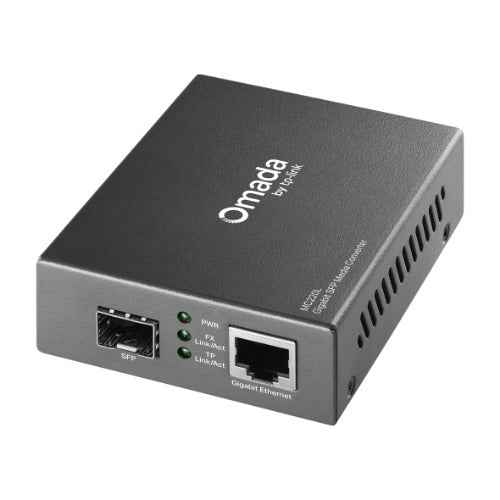
TP-Link MC220L Gigabit SFP Media Converter
TP-Link MC220L Gigabit SFP Media Converter
SKU:NWTL-MC220L
Couldn't load pickup availability
- See our return policy
- 36 months Manufacturer Warranty
Product Information
| Brand | TP-LINK |
|---|---|
| Category | Network - Consumer |
| SKU | NWTL-MC220L |
| Availability | In Stock |

Overview
- The TP-Link MC220L Gigabit Media Converter bridges Ethernet and fibre optic networks, enabling organisations to extend connectivity over distances that standard copper cabling cannot reach. The device converts standard Gigabit Ethernet signals to SFP fibre format, supporting both single-mode and multi-mode fibre types depending on distance requirements.
With single-mode capability extending to 10km and multi-mode reaching 0.55km, the MC220L is ideal for campus networks, inter-building connectivity, and enterprise deployments requiring reliable, long-distance links. The hot-swappable SFP port provides flexibility in fibre module selection and simplifies maintenance without requiring full device replacement.
Compliant with IEEE 802.3ab (Gigabit Ethernet) and 802.3z (Fibre Channel) standards, this media converter integrates seamlessly into existing infrastructure while delivering the performance and reliability expected in professional network environments.
Specifications
| Brand | TP-Link |
|---|---|
| Model | MC220L |
| Product Type | Gigabit Media Converter |
| Interface Type | Gigabit Ethernet to SFP |
| Ethernet Port | 1 x Gigabit RJ45 |
| Fibre Port | 1 x Hot-swappable SFP |
| Multi-Mode Fibre Range | 0.55 km |
| Single-Mode Fibre Range | 10 km |
| Standards Compliance | IEEE 802.3ab, IEEE 802.3z |
| Warranty | 36 months |
Key Features
Ideal For
FAQs
What is the difference between single-mode and multi-mode fibre on the MC220L?
Single-mode fibre supports longer distances (up to 10km) with a smaller core, making it ideal for campus-wide or long-distance links. Multi-mode fibre has a larger core and is suitable for shorter distances (0.55km) such as between nearby buildings. The choice depends on your network distance requirements and existing fibre infrastructure.
Can I use the MC220L to convert my existing Ethernet network to fibre?
Yes. The MC220L converts standard Gigabit Ethernet (RJ45) signals to SFP fibre format. You connect an Ethernet cable to the RJ45 port and insert the appropriate SFP module into the fibre port to extend your network over fibre optic cable.
What SFP modules are compatible with the MC220L?
The MC220L has a hot-swappable SFP port that supports industry-standard SFP transceivers. Ensure you select SFP modules that match your fibre type (single-mode or multi-mode) and distance requirements. Consult TP-Link compatibility guidelines or contact our team for specific module recommendations.
Is the MC220L suitable for data centre environments?
Yes. The MC220L is compliant with IEEE 802.3ab and 802.3z standards and is designed for enterprise and data centre network deployments. It provides reliable Gigabit fibre connectivity for high-performance networking requirements.
How do I replace the SFP module if it fails?
The SFP port is hot-swappable, meaning you can remove and replace the module without powering down the device or interrupting other network connections. Simply release the latch on the SFP module and slide it out, then insert the new module until it clicks into place.
What warranty does the MC220L include?
The TP-Link MC220L is backed by a 36-month manufacturer warranty, providing long-term protection and support for your investment.