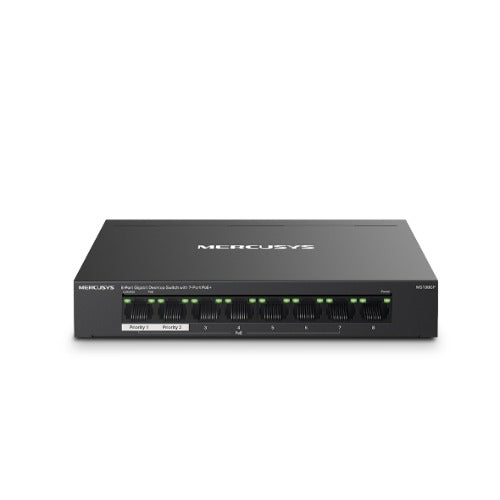
Mercusys MS108GP 8-Port Gigabit Switch with PoE+
Mercusys MS108GP 8-Port Gigabit Switch with PoE+
SKU:NWMS-MS108GP
The Mercusys MS108GP is an 8-port Gigabit network switch with 7-port PoE+ support, designed for small to medium business networks. Featuring high-power PoE delivery up to 30W per port and extended transmission range up to 250m, it simplifies network deployment and reduces cabling complexity.
Couldn't load pickup availability
- See our return policy
- 5 years Manufacturer Warranty
Product Information
| Brand | TP-LINK |
|---|---|
| Category | Network - Consumer |
| SKU | NWMS-MS108GP |
| Availability | In Stock |

Overview
- The Mercusys MS108GP is a practical 8-port Gigabit network switch built for businesses that need to power and connect multiple network devices efficiently. With 7 PoE+ ports delivering up to 30W per port, it eliminates the need for separate power supplies for devices like IP cameras, access points, and VoIP phones.
The switch's extended PoE transmission capability—up to 250m in Extend Mode—allows you to install powered devices at greater distances without additional infrastructure. This is particularly valuable for larger office spaces, warehouses, and outdoor deployments.
Designed for reliability, the MS108GP features a durable metal casing for heat dissipation, port isolation mode for network security, and plug-and-play operation requiring no complex setup. It's an ideal solution for businesses looking to simplify network deployment while reducing cabling and power distribution costs.
Specifications
| ports | 8× RJ45 Gigabit Ethernet (10/100/1000 Mbps) |
|---|---|
| poe_ports | 7 PoE+ ports |
| poe_power_per_port | Up to 30W per port |
| poe_total_power_budget | 65W maximum |
| poe_standards | IEEE 802.3af/at compliant |
| poe_range | Up to 250m in Extend Mode |
| casing | Metal |
| features | Port isolation mode, plug-and-play |
| warranty | 5 years |
Key Features
Ideal For
FAQs
What devices can I power with the MS108GP PoE ports?
The MS108GP supports any IEEE 802.3af/at compliant powered devices, including IP cameras, wireless access points, VoIP phones, and IoT sensors. Each port can deliver up to 30W of power.
Can I use all 8 ports simultaneously?
Yes, all 8 ports can be used at the same time. However, the total PoE power budget is 65W. If powering multiple high-power devices, ensure your total power draw does not exceed this limit.
What is Extend Mode and how does it work?
Extend Mode increases the PoE transmission distance from the standard 100m to 250m, allowing you to install powered devices further from the switch without additional infrastructure.
What is port isolation mode used for?
Port isolation mode divides traffic between specific ports, preventing devices on isolated ports from communicating with each other. This improves network security and stability in shared network environments.
Is the MS108GP suitable for outdoor use?
The MS108GP is rated for desktop/indoor use. For outdoor installations, consider a weatherproof outdoor-rated switch. However, powered devices connected via extended PoE cables can be deployed outdoors.
What warranty does the MS108GP include?
The MS108GP comes with a 5-year manufacturer's warranty covering defects in materials and workmanship.
Does the switch require configuration or driver installation?
No, the MS108GP is plug-and-play. It requires no configuration, drivers, or software installation. Simply connect power and Ethernet cables to begin using it.