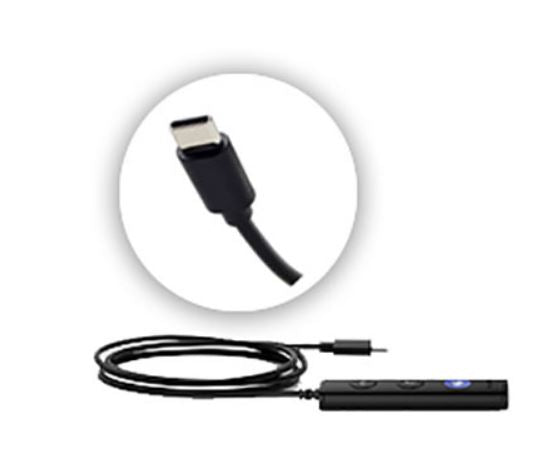
Yealink YHC20T-USB-C Headset Controller with Microsoft Teams Button
Yealink YHC20T-USB-C Headset Controller with Microsoft Teams Button
SKU:IPY-YHC20T-USB-C
Couldn't load pickup availability
- See our return policy
- Manufacturer Manufacturer Warranty
Product Information
| Brand | Yealink |
|---|---|
| Category | VOIP Headsets |
| SKU | IPY-YHC20T-USB-C |
| Availability | In Stock |

Overview
- The Yealink YHC20T-USB-C controller is a replacement component that upgrades your existing Yealink UH36 headset with USB-C connectivity and Microsoft Teams integration. This controller is essential for organisations transitioning to modern devices that prioritise USB-C over legacy USB-A connections.
Designed for seamless VoIP and unified communications, the YHC20T-USB-C features a dedicated Microsoft Teams button, allowing users to quickly answer, end, or manage calls without touching their device. The USB-C interface ensures compatibility with the latest laptops, tablets, and smartphones, making it ideal for hybrid workforces and bring-your-own-device (BYOD) environments.
Simply replace your existing controller to modernise your headset setup without purchasing entirely new hardware. The straightforward installation process means minimal downtime and maximum cost efficiency for growing teams.
Specifications
| model | YHC20T-USB-C |
|---|---|
| product_type | Headset Controller |
| connectivity | USB-C |
| compatible_headsets | Yealink UH36 |
| features | Microsoft Teams button |
| warranty_months | 12 |
| warranty_type | Manufacturer |
Key Features
Ideal For
FAQs
Is the YHC20T-USB-C compatible with my Yealink headset?
The YHC20T-USB-C is designed for Yealink UH36 headsets. Check your headset model before purchasing to ensure compatibility.
What is the difference between USB-A and USB-C connectivity?
USB-C is a modern connector standard found on newer laptops, tablets, and smartphones. The YHC20T-USB-C enables compatibility with these devices, replacing the older USB-A connector.
Can I use the Microsoft Teams button with other applications?
The Microsoft Teams button is optimised for Microsoft Teams integration. Functionality with other applications may vary depending on your system setup.
How do I install the YHC20T-USB-C controller?
The controller is designed as a direct replacement for your existing unit. Disconnect the old controller and connect the new one to your headset and USB-C port. No additional drivers are typically required.
Is the YHC20T-USB-C covered by warranty?
Yes, the YHC20T-USB-C includes a 12-month manufacturer warranty covering defects and faults.
Does this controller work with smartphones and tablets?
Yes, the USB-C connectivity enables use with smartphones and tablets that support USB-C, expanding your device flexibility.