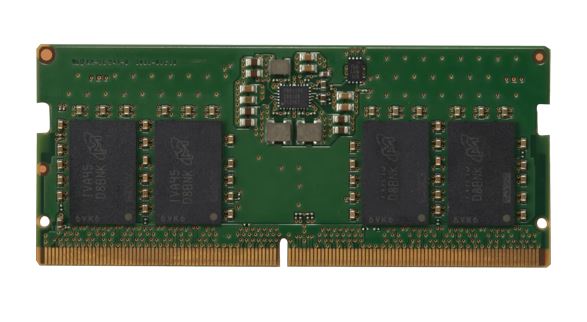
HP 8GB DDR5-4800 SODIMM Notebook Memory
HP 8GB DDR5-4800 SODIMM Notebook Memory
SKU:MECN5-1X8G48-P
Couldn't load pickup availability
- See our return policy
- 3-year limited Manufacturer Warranty
Product Information
| Brand | 8ware |
|---|---|
| Category | Memory |
| SKU | MECN5-1X8G48-P |
| Availability | In Stock |

Overview
- The HP 8GB DDR5-4800 SODIMM is a high-capacity memory module engineered for modern notebook systems. Delivering 4800MHz performance with industry-leading power efficiency at 1.25V, it accelerates file manipulation and multitasking on mobile platforms.
This single 8GB SODIMM module is designed for seamless compatibility with DDR5-capable notebooks and ultrabooks. The unbuffered design ensures broad system support, while optimised timings balance speed and stability across diverse laptop platforms.
Ideal for business users, mobile professionals, and IT deployment teams seeking reliable memory upgrades. The 3-year warranty provides confidence in long-term reliability and performance.
Specifications
| Memory Type | DDR5 SODIMM |
|---|---|
| Capacity | 8GB |
| Speed | 4800MHz |
| CAS Latency | 40 |
| Extended Timings | 40-39-39 |
| Voltage | 1.25V |
| Module Type | SODIMM (Unbuffered) |
| Kit Quantity | 1 |
| Form Factor | Notebook/Laptop |
| Warranty | 3-year limited |
Key Features
Ideal For
FAQs
Is this memory compatible with my notebook?
This DDR5 SODIMM is compatible with notebooks and laptops featuring DDR5 memory slots. Check your system specifications to confirm DDR5 support. Most modern notebooks from 2023 onwards support DDR5 memory.
Can I use this module alongside existing memory?
Yes. You can pair this 8GB DDR5-4800 SODIMM with other DDR5 modules in available slots. Ensure all modules are DDR5 compatible for optimal performance.
What is the voltage requirement?
This module operates at 1.25V, which is the standard operating voltage for DDR5 memory. This low voltage design improves power efficiency compared to earlier DDR generations.
What does CAS Latency 40 mean?
CAS Latency (40) indicates the number of clock cycles required to access data. Lower latency typically improves responsiveness, though real-world performance differences depend on your workload and system configuration.
Is installation difficult?
Installing a SODIMM module is straightforward. Power off your notebook, open the memory compartment, insert the module at a 45-degree angle into the available slot, and press down until it clicks into place. Refer to your notebook manual for specific instructions.
What warranty coverage is included?
This module includes a 3-year limited warranty covering manufacturing defects and hardware failure. This warranty does not cover physical damage or misuse.
Will upgrading memory improve my notebook's performance?
Upgrading from insufficient RAM to 8GB can noticeably improve multitasking, application responsiveness, and file handling speed, particularly for professional workloads. Performance gains depend on your previous memory capacity and workload type.