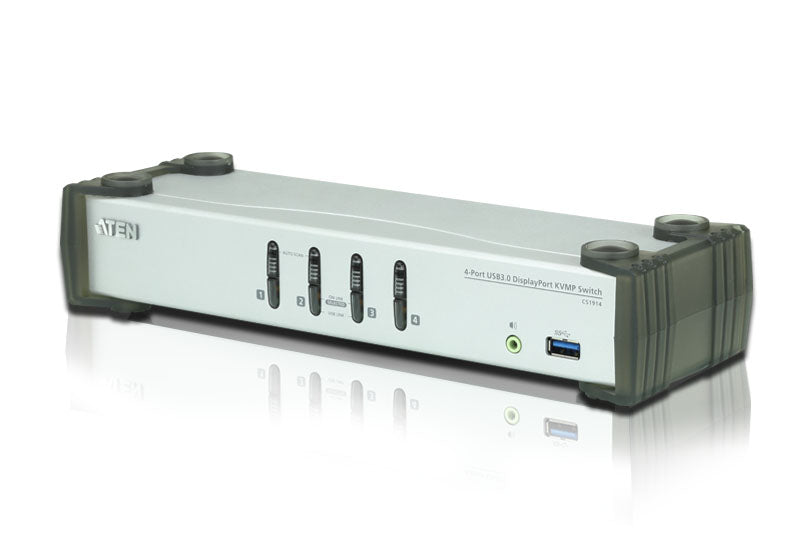
Aten CS1914 4-Port DisplayPort KVMP Switch
Aten CS1914 4-Port DisplayPort KVMP Switch
SKU:KVA-CS-1914
The Aten CS1914 is a 4-port desktop KVMP switch designed for professionals requiring high-resolution multi-computer control. Featuring DisplayPort connectivity, USB 3.1 hub functionality, and flexible switching methods, it delivers seamless access to four computers from a single keyboard, mouse and monitor.
Couldn't load pickup availability
- See our return policy
- 24 months Manufacturer Warranty
Product Information
| Brand | Aten |
|---|---|
| Category | KVM Switch & Video |
| SKU | KVA-CS-1914 |
| Availability | In Stock |

Overview
- The Aten CS1914 is a professional-grade 4-port KVMP switch engineered for demanding creative and technical workflows. It enables seamless control of four DisplayPort-connected computers using a single keyboard, mouse and monitor, eliminating the need for multiple peripheral sets or dedicated USB hubs.
With native 4K resolution support at 30 Hz and USB 3.1 Gen 1 connectivity delivering 5 Gbps transfer speeds, the CS1914 accommodates modern high-performance workstations. The independent switching capability is particularly valuable—allowing you to control video output on one computer while managing USB peripherals on another, a critical feature for workflows involving shared printers, external storage or specialised hardware.
The switch offers three intuitive control methods (front panel buttons, mouse-driven switching, and keyboard hotkeys), making it practical for fast-paced environments. Integrated audio passthrough via DisplayPort ensures complete multimedia support without additional cables. The CS1914 is particularly suited to video editing suites, design studios and technical workcentres where efficiency and multi-system management are essential.
Specifications
| Number of Ports | 4 |
|---|---|
| Video Standard | DisplayPort |
| Maximum Video Resolution | 3840 x 2160 @ 30 Hz |
| USB Hub Standard | USB 3.1 Gen 1 |
| USB Data Transfer Rate | 5 Gbps |
| Switching Methods | Front panel pushbuttons, mouse control, keyboard hotkeys |
| Audio Support | Yes, via DisplayPort |
| Independent Switching | Yes, KVM and USB peripherals can be controlled independently |
| USB Ports | 2x USB |
| Warranty Period | 24 months |
| Included Accessories | Cables included |
Key Features
Ideal For
FAQs
Can I control four different computers simultaneously with the CS1914?
The CS1914 allows you to connect four computers but control them through a single keyboard, mouse and monitor. You switch between computers using the front panel buttons, mouse or hotkeys. You can also use the independent switching feature to have KVM control focused on one computer while USB peripherals (like a printer) are shared with another.
What video resolutions does the CS1914 support?
The CS1914 supports resolutions up to 3840 x 2160 at 30 Hz, which covers 4K displays. This makes it suitable for professional video, design and CAD applications requiring high-definition visuals.
Does the CS1914 work with extended desktop setups?
Yes, the CS1914 supports extended desktop configurations. However, when switching between ports in an extended desktop setup, windows may be resized or repositioned back to default configuration on the main display—this is common with DisplayPort KVM switches.
What USB data transfer speeds does the CS1914 offer?
The CS1914 includes a SuperSpeed USB 3.1 Gen 1 hub with 5 Gbps data transfer rates, providing fast file transfers and responsive peripheral performance.
Can I share audio across multiple computers?
Yes, the CS1914 allows you to share audio from each connected computer in HD quality when transmitted via DisplayPort, so you can listen to audio from whichever computer you're currently controlling.
What switching methods are available?
The CS1914 provides three switching methods: front panel pushbuttons for quick manual switching, mouse-based switching for convenience, and keyboard hotkeys for rapid access to specific computers.
Do I need to purchase additional USB hubs or peripheral splitters?
No. The independent switching feature means the KVM control can focus on one computer while USB peripherals (printer, modem, external storage) remain connected to another, eliminating the need for separate USB hubs or standalone peripheral sharers.