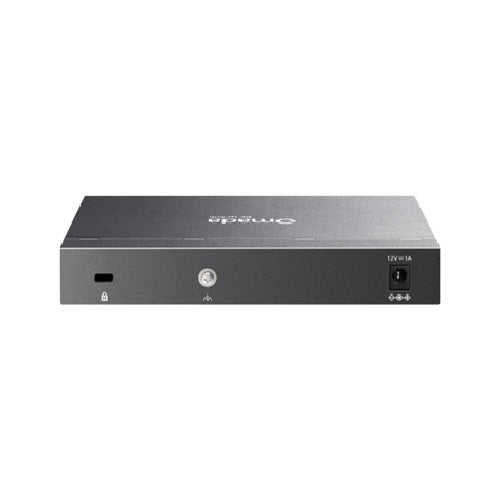
TP-Link Omada ES206X-M2 2.5G Managed Network Switch
TP-Link Omada ES206X-M2 2.5G Managed Network Switch
SKU:NWTL-ES206X-M2
The TP-Link Omada ES206X-M2 is a 2.5G managed network switch designed for small to medium-sized businesses. Featuring five 2.5GbE ports, 10G SFP+ uplink, and fanless operation, it delivers reliable performance with advanced traffic management and VLAN support for growing networks.
Couldn't load pickup availability
Product Information
| Brand | TP-LINK |
|---|---|
| Category | Network - SMB |
| SKU | NWTL-ES206X-M2 |
| Availability | In Stock |

Overview
- The TP-Link Omada ES206X-M2 is a smart-managed network switch that bridges the gap between basic unmanaged switches and high-end enterprise equipment. With five 2.5GbE ports and a 10G SFP+ slot, it provides the performance needed for modern business applications including HD video conferencing, large file transfers, and virtualisation workloads.
Designed for small to medium-sized businesses, this switch offers advanced Layer 2 features such as VLAN support, IGMP snooping, static link aggregation, and comprehensive QoS controls. The fanless design eliminates cooling costs and noise, making it ideal for office and retail environments. Installation is flexible—mount on a desktop or wall to suit your space.
TP-Link's Omada management ecosystem allows for centralised network administration across multiple switches and access points. Storm control, port mirroring, and detailed traffic statistics help IT teams monitor and troubleshoot network performance. With ±6kV surge protection and a 5-year warranty, this switch provides the reliability and peace of mind essential for business continuity.
Specifications
| Interface | {"Ethernet Ports"=>"5× 2.5 Gbps RJ45", "Uplink Ports"=>"1× 10 Gbps SFP+ Slot", "Port Features"=>"Auto-Negotiation, Auto MDI/MDIX"} |
|---|---|
| Physical | {"Dimensions"=>"158 × 100.7 × 25.4 mm (W × D × H)", "Installation"=>"Desktop or Wall Mount", "Cooling"=>"Fanless", "Security"=>"Physical Security Lock Slot"} |
| Power | {"Power Supply"=>"DC Power Adapter (12 VDC / 1 A)", "Surge Protection"=>"±6kV on Ethernet Ports"} |
| Quality of Service | {"QoS Types"=>"Port-based, 802.1p, DSCP", "Priority Queues"=>"8", "Scheduling"=>"WRR (Weighted Round Robin)", "Bandwidth Control"=>"Port-based rate limiting", "Storm Control"=>"Broadcast, Multicast, Unknown-Unicast control (kbps/pps)"} |
| Layer 2 Features | {"Link Aggregation"=>"Static", "Loop Prevention"=>"Loopback Detection", "Flow Control"=>"802.3x", "Port Mirroring"=>"One-to-One, Many-to-One, Ingress/Egress/Both", "Port Statistics"=>"Traffic monitoring and mirror status"} |
| VLAN | {"VLAN Types"=>"Port-Based, 802.1Q Tag, MTU", "Maximum VLAN Groups"=>"32", "Maximum VLAN IDs"=>"4K", "Transmission Method"=>"Store-and-Forward"} |
| Multicast | {"IGMP Snooping"=>"v1/v2/v3", "Fast Leave"=>"Supported"} |
| Standards | {"LLDP"=>"802.1ab", "Warranty"=>"5 years"} |
Key Features
Ideal For
FAQs
What is the difference between the 5× 2.5GbE ports and the 10G SFP+ slot?
The five 2.5GbE ports are for standard network devices such as computers, printers, and access points. The 10G SFP+ slot is for high-speed uplink connections to core network infrastructure or storage systems, providing 4× the bandwidth for backbone connectivity.
Does the ES206X-M2 require a fan or cooling?
No. The switch features fanless design, which means silent operation, no maintenance, and lower power consumption. It is suitable for office and retail environments where noise is a concern.
Can I use this switch to segment my network with VLANs?
Yes. The ES206X-M2 supports up to 32 VLAN groups with 4K VLAN IDs. You can create port-based or 802.1Q tag VLANs to isolate traffic between departments, guest networks, or security zones.
What is QoS and why would I use it?
QoS (Quality of Service) allows you to prioritise network traffic based on application type or user role. With 8 priority queues and bandwidth control, you can ensure critical business applications like VoIP and video conferencing receive consistent performance even during peak usage.
Is the switch managed or unmanaged?
The ES206X-M2 is a smart-managed switch. It offers advanced features such as VLAN, QoS, IGMP snooping, and port mirroring without the complexity of a full enterprise switch. It integrates with TP-Link's Omada management platform for centralised network administration.
Can I mount this switch vertically or on a wall?
Yes. The switch supports both desktop placement and wall mounting, making it flexible for different installation environments. It is compact at 158 × 100.7 × 25.4 mm, fitting easily into equipment racks or beside monitors.
What warranty and support does TP-Link provide?
The ES206X-M2 includes a 5-year manufacturer warranty covering hardware defects. TP-Link provides technical support through their global network of partners and distributors.