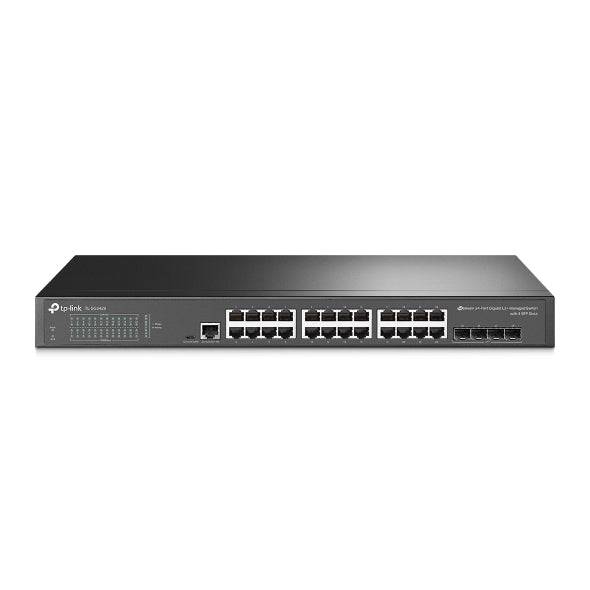
TP-Link SG3428 24-Port Gigabit Managed Switch
TP-Link SG3428 24-Port Gigabit Managed Switch
SKU:NWTL-SG3428
The TP-Link SG3428 is a 24-port Gigabit managed switch designed for small to medium business networks. Featuring 4 SFP slots, Omada SDN controller integration, and comprehensive Layer 2+ management capabilities, it delivers reliable network performance and centralised control for growing organisations.
Couldn't load pickup availability
- See our return policy
- 60 months Manufacturer Warranty
Product Information
| Brand | TP-LINK |
|---|---|
| Category | Network - SMB |
| SKU | NWTL-SG3428 |
| Availability | In Stock |

Overview
- The TP-Link SG3428 is a 24-port Gigabit L2+ managed switch designed to provide reliable, scalable network infrastructure for small to medium business environments. With 24 Gigabit RJ45 ports and 4 Gigabit SFP slots, it offers flexible connectivity options for both copper and fibre-based network expansion.
Built for integration with TP-Link's Omada SDN controller, the SG3428 enables centralised network management, policy enforcement, and traffic optimisation from a single dashboard. This makes it ideal for organisations managing multiple network segments or distributed office locations.
The switch supports comprehensive Layer 2+ features including advanced VLAN support (802.1Q, QinQ), spanning tree protocols (STP/RSTP/MSTP), and link aggregation (LACP). Security capabilities include 802.1X port-based access control, RADIUS/TACACS+ authentication, and granular access control lists (ACL). Built-in QoS ensures critical applications receive priority bandwidth.
With its 1U rack-mountable design, the SG3428 fits seamlessly into server room and data centre environments. The inclusion of dual image and dual configuration support ensures high availability and simplifies firmware updates without service interruption.
Specifications
| Model | SG3428 |
|---|---|
| Ports | 24× Gigabit RJ45 ports, 4× Gigabit SFP slots |
| Console Port | RJ45/Micro-USB |
| Switch Fabric | Not specified |
| Maximum Throughput | Not specified |
| Forwarding Rate | Not specified |
| Backplane Bandwidth | Not specified |
| Memory | Not specified |
| Chassis Type | 1U 19-inch rack-mountable steel case |
| Layer 2 Features | 802.1Q VLAN, QinQ, STP/RSTP/MSTP, IGMP Snooping, LACP, 802.1p/DSCP QoS |
| Security Features | 802.1X, RADIUS/TACACS+ authentication, ACL |
| Management | CLI, SNMP, Omada SDN Controller integration |
| Additional Features | Static routing, OAM, Dual image/configuration, IPv6 support |
| Warranty | 60 months |
Key Features
Ideal For
FAQs
What is the difference between the SFP slots and the Gigabit ports?
The 24 Gigabit ports connect to standard network cables (RJ45), while the 4 SFP slots accept Small Form-factor Pluggable optical transceivers. SFP slots allow you to add fibre optic connectivity for longer-distance uplinks or higher bandwidth requirements.
Can the TP-Link SG3428 be managed without Omada SDN controller?
Yes, the switch can be managed independently via CLI, SNMP, or a web interface. However, Omada SDN controller integration provides centralised management across multiple switches and simplifies network policy deployment.
What is LACP and why does it matter?
LACP (Link Aggregation Control Protocol) allows you to combine multiple switch ports into a single logical link. This increases bandwidth between connected devices and provides redundancy if one physical link fails.
Is this switch suitable for a small business network?
Yes. With 24 ports and managed switching capabilities, the SG3428 is designed for small to medium-sized businesses. It provides the control and flexibility needed to grow network infrastructure without immediate replacement.
What does 'L2+' mean?
Layer 2+ refers to switches that support standard Layer 2 features (VLAN, STP, MAC filtering) plus limited Layer 3 capabilities such as static routing. This sits between basic managed switches and full Layer 3 routers.
How does dual image and configuration support improve reliability?
Dual image support lets you maintain two firmware versions. If an update causes issues, the switch can boot the previous version. Dual configuration backup allows you to store and quickly restore different network settings.
Can I use this switch in a rack mount server environment?
Yes. The 1U 19-inch rack-mountable design makes it ideal for data centre and server room installations where space is limited and standardised mounting is required.
What is QoS and how does it benefit my network?
QoS (Quality of Service) prioritises certain types of traffic, such as VoIP or video conferencing, over general data. The SG3428 supports 802.1p/DSCP QoS tagging, ensuring critical applications maintain consistent performance even during peak usage.