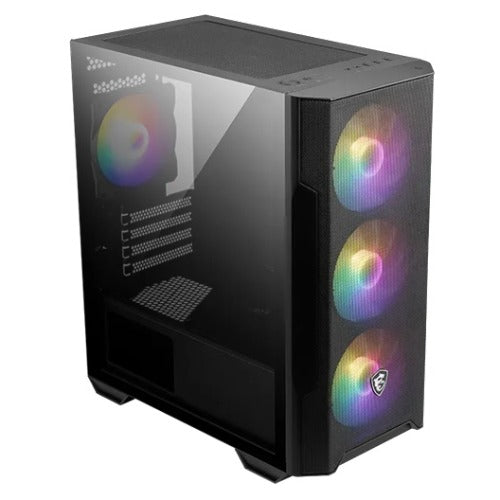
MSI MAG FORGE M100R Micro ATX PC Case
MSI MAG FORGE M100R Micro ATX PC Case
SKU:CAM-FORGEM100R
The MSI MAG FORGE M100R is a compact Micro ATX case designed for builders seeking excellent airflow and RGB aesthetics. Featuring four pre-installed ARGB fans, tempered glass side panel, and support for up to six system fans, it delivers superior cooling and striking visual appeal for gaming and workstation builds.
Couldn't load pickup availability
- See our return policy
- 12 months Manufacturer Warranty
Product Information
| Brand | MSI |
|---|---|
| Category | Cases & Accessories |
| SKU | CAM-FORGEM100R |
| Availability | In Stock |

Overview
- The MSI MAG FORGE M100R is a well-equipped Micro ATX tower case designed for builders who demand both performance and aesthetics. It ships with four ARGB fans already installed, eliminating the need for additional fan purchases and simplifying the build process. The case supports up to six system fans total, allowing you to scale cooling capacity as your build requirements grow.
The premium 3mm tempered glass side panel provides an unobstructed view of your components and RGB lighting effects. An intuitive LED switch button controls nine different lighting modes, giving you complete visual customisation without software complexity. The magnetic dust filter on top makes routine maintenance straightforward—simply remove it for cleaning without tools.
Designed for both Micro-ATX and Mini-ITX motherboards, the M100R accommodates modern graphics cards up to 300 mm in length and high-performance CPU coolers up to 160 mm tall. Support for multiple radiator sizes (front 120/240 mm, top 120/240 mm, rear 120 mm) makes it suitable for liquid cooling enthusiasts. With dimensions of 388 x 200 x 423 mm and a net weight of 4.14 kg, it strikes a balance between compact form factor and internal space.
Specifications
| Brand | MSI |
|---|---|
| Model | MAG FORGE M100R |
| Product Name | MAG FORGE M100R Black |
| Case Form Factor | Micro ATX Tower |
| Motherboard Compatibility | Micro-ATX / Mini-ITX |
| Colour | Black |
| Front USB Ports | 1x USB 3.2 Gen 1 Type-A, 2x USB 2.0 Type-A |
| Audio Connectors | 1x Audio, 1x Microphone |
| Drive Mount Capacity | 2x 2.5", 1x 2.5"/3.5", 1x 3.5" |
| PCI-E Expansion Slots | 4 |
| Maximum GPU Length | 300 mm (11.81 inches) |
| Maximum CPU Cooler Height | 160 mm (6.3 inches) |
| Power Supply Compatibility | ATX |
| Maximum PSU Length | 300 mm (11.81 inches) without 3.5" HDD tray |
| Front Fan Support | 3x 120 mm |
| Top Fan Support | 2x 120 mm |
| Rear Fan Support | 1x 120 mm |
| Maximum Total Fans | 6x 120 mm |
| Pre-installed Fans | 3x 120 mm ARGB (front), 1x 120 mm ARGB (rear) |
| Front Radiator Support | 120 mm / 240 mm |
| Top Radiator Support | 120 mm / 240 mm |
| Rear Radiator Support | 120 mm |
| Side Panel | 3mm tempered glass |
| Dust Filter | Magnetic filter on top |
| LED Control | 1 to 6 ARGB LED control board, 9 lighting effects via LED switch button |
| Dimensions | 388 x 200 x 423 mm (15.28 x 7.87 x 16.65 inches) |
| Net Weight | 4.14 kg (9.13 lbs) |
| Gross Weight | 5.03 kg (11.09 lbs) |
| Warranty | 12 months |
Key Features
Ideal For
FAQs
What motherboard types does the MSI MAG FORGE M100R support?
The case supports both Micro-ATX and Mini-ITX motherboards, making it suitable for compact builds without compromising component compatibility.
How many fans come pre-installed in this case?
Four ARGB fans come pre-installed: three 120 mm fans in the front and one 120 mm fan in the rear. The case can accommodate up to six total system fans.
Can I install liquid cooling in the MAG FORGE M100R?
Yes. The case supports radiators in multiple locations: front (120/240 mm), top (120/240 mm), and rear (120 mm), making it suitable for both air and liquid cooling setups.
Is the dust filter easy to clean?
Yes. The magnetic dust filter on the top of the case can be easily removed and cleaned without tools, making routine maintenance straightforward.
What is the maximum graphics card length supported?
The case supports graphics cards up to 300 mm in length, accommodating most modern mid-range to high-end GPUs.
How do I control the RGB lighting on the fans?
An LED switch button on the case allows you to intuitively cycle through nine different lighting effects without requiring software or complex configuration.
What size power supply does this case require?
The case supports standard ATX power supplies up to 300 mm in length (without the 3.5" HDD tray installed), covering the majority of modern PSUs.