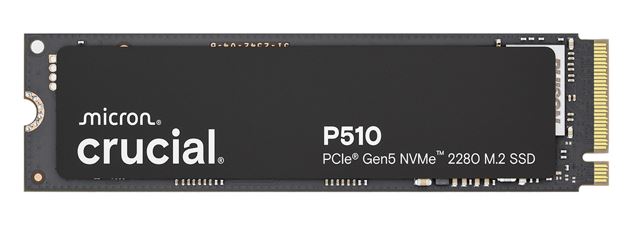
Crucial P510 1TB Gen5 NVMe M.2 SSD
Crucial P510 1TB Gen5 NVMe M.2 SSD
SKU:HBC-P510-1TB-P
Couldn't load pickup availability
- See our return policy
- 5-year limited warranty Manufacturer Warranty
Product Information
| Brand | Micron (Crucial)-P |
|---|---|
| Category | Hard Disk Drives - SSD |
| SKU | HBC-P510-1TB-P |
| Availability | In Stock |

Overview
- The Crucial P510 delivers industry-leading Gen5 performance with sequential read speeds up to 11,000 MB/s, making it one of the fastest M.2 NVMe drives available. Engineered for both laptops and desktops, its single-sided 2280 design installs easily into virtually any compatible system without requiring additional heatsinks or modifications.
Built on Micron's legacy of reliability, the P510 includes full-drive encryption, advanced data protection algorithms, and adaptive thermal management to ensure consistent performance under demanding workloads. The drive also features integrated power loss immunity and active garbage collection, protecting your data and maintaining speed over time.
With endurance rated for extended use and backed by a comprehensive 5-year limited warranty, the Crucial P510 is a trusted choice for IT professionals, system builders, and organisations requiring dependable high-speed storage. Whether upgrading existing infrastructure or building new systems, this drive delivers the performance and reliability needed for modern computing.
Specifications
| Brand | Crucial |
|---|---|
| Manufacturer | Micron |
| Model | P510 |
| Product Type | NVMe M.2 SSD |
| Interface | PCIe 5.0 NVMe |
| Form Factor | M.2 2280 |
| Capacity | 1TB |
| Sequential Read Speed | 11,000 MB/s |
| Sequential Write Speed | 9,500 MB/s |
| Random Read (IOPS) | Up to 1.4M |
| Random Write (IOPS) | Up to 1.4M |
| Endurance (TBW) | 100 TBW |
| NAND Type | G9 |
| Warranty | 5-year limited warranty |
| MTTF | 1.5 million hours |
| Encryption | Full-drive encryption |
| Data Protection | ECC, multi-step data integrity algorithm |
| Thermal Management | Adaptive thermal protection |
| Power Loss Protection | Integrated power loss immunity |
| Garbage Collection | Active garbage collection |
| SMART Support | Yes |
| TRIM Support | Yes |
| Device Sleep | Supported |
| Backward Compatibility | Yes |
Key Features
Ideal For
FAQs
What is the difference between the Crucial P510 and older PCIe 4.0 drives?
The P510 uses PCIe 5.0 technology, delivering up to 11,000 MB/s read speeds—roughly double the performance of PCIe 4.0 drives. This translates to faster application launches, quicker file transfers, and reduced load times in demanding workloads.
Will the Crucial P510 work in my laptop?
Yes, if your laptop has an M.2 NVMe slot compatible with PCIe 5.0 (or earlier PCIe versions, as the P510 is backward compatible). The single-sided 2280 design fits most modern laptops and desktops. Check your device specifications before purchasing.
What does the 100 TBW endurance rating mean?
TBW (Terabytes Written) indicates how much data you can write to the drive over its lifetime. 100 TBW is sufficient for typical consumer and business use; even heavy users writing 50GB daily would take years to reach this limit.
Does the P510 come with a heatsink?
The standard 1TB model does not include an integrated heatsink. Crucial offers heatsink-equipped variants available separately. Most modern systems have adequate cooling for the P510 without additional heatsinks.
Is the Crucial P510 suitable for enterprise or server use?
The Crucial P510 is optimised for consumer and prosumer systems. For enterprise or server deployments, consult with Hyetech about Crucial's enterprise-grade SSD solutions designed for data centre requirements.
What warranty and support does Hyetech provide?
The Crucial P510 includes a 5-year limited manufacturer warranty. Hyetech provides Australia-wide delivery and standard customer support. For warranty claims or technical issues, contact Hyetech directly with your proof of purchase.
How do I install the Crucial P510 in my system?
Installation is straightforward: power down your system, locate the M.2 slot, remove the protective cover, insert the drive at a 30-degree angle, and press down firmly until it clicks. Secure with the provided screw if needed. Consult your system manual for specific instructions.