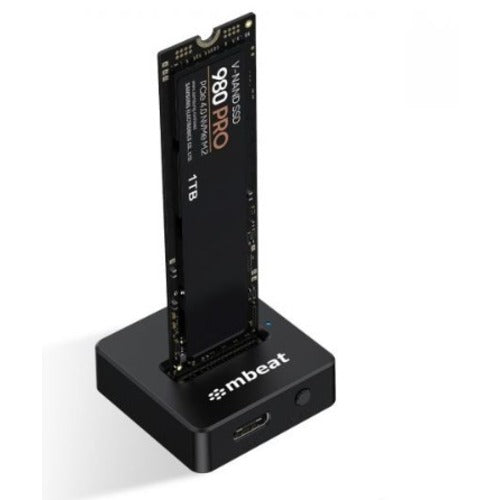
mbeat H5 SSD Mini Dock for M.2 NVMe and SATA
mbeat H5 SSD Mini Dock for M.2 NVMe and SATA
SKU:USMB-HDD-M2H5K
Couldn't load pickup availability
- See our return policy
- 12 months Manufacturer Warranty
Product Information
| Brand | MBEAT |
|---|---|
| Category | Hard Drives - External |
| SKU | USMB-HDD-M2H5K |
| Availability | In Stock |

Overview
- The mbeat H5 SSD Mini Dock simplifies M.2 drive management by eliminating the need for tools, enclosures, and compatibility workarounds. Its open frame design allows you to insert or remove drives in seconds, making it ideal for testing, backups, migrations, and everyday high-performance workflows.
With USB 3.2 Gen2 delivering up to 10Gbps transfer speeds, the H5 handles system cloning, media editing, and large file transfers efficiently. The dock supports both NVMe and SATA M.2 SSDs across all popular form factors (2230, 2242, 2260, 2280) with B+M and M Key configurations, ensuring compatibility with most consumer and professional drives.
The integrated 2-in-1 USB-C/A cable connects instantly to modern and legacy laptops, eliminating the need for adapters. With reliable cross-platform support for Windows and macOS, the H5 is a dependable solution for IT environments, offices, and remote work setups.
Specifications
| USB Port | USB-C 3.2 Gen2 |
|---|---|
| Data Speed | Up to 10Gbps |
| USB Compatibility | Backward compatible with USB 3.1, USB 3.0, and USB 2.0 |
| SSD Interface | B+M and M Key SATA/PCIe and NVMe SSD |
| Supported SSD Sizes | 2230, 2242, 2260, 2280 |
| Protocol Support | UASP and hot plug-and-play |
| Cable | 2-in-1 USB-C/A cable |
| Cable Length | 29 cm |
| Product Dimensions | 3.65 × 3.65 × 1.13 cm |
| Product Weight | 0.011 kg |
| Package Dimensions | 17.5 × 9.5 × 2 cm |
| Package Weight | 0.066 kg |
| Warranty | 12 months |
| Package Contents | M.2 SSD Mini Dock, 2-in-1 USB-C/A cable, User Manual, Product Registration Card |
Key Features
Ideal For
FAQs
Which M.2 SSD sizes does the mbeat H5 support?
The H5 supports M.2 drives in 2230, 2242, 2260, and 2280 sizes. It works with both NVMe and SATA SSDs using B+M and M Key configurations.
What are the data transfer speeds?
The H5 delivers up to 10Gbps transfer speeds via USB 3.2 Gen2, enabling fast cloning, migrations, and large file transfers.
Do I need tools to use the mbeat H5?
No. The open frame design allows you to insert and remove M.2 drives without tools or enclosures, making swaps quick and effortless.
Is the H5 compatible with older USB versions?
Yes. The H5 is backward compatible with USB 3.1, USB 3.0, and USB 2.0, ensuring connectivity with legacy devices.
What operating systems does the mbeat H5 support?
The H5 works reliably on both Windows and macOS, making it suitable for mixed IT environments.
What cable does the H5 include?
The dock includes a 2-in-1 USB-C/A cable that connects to either USB-C or USB-A host laptops, eliminating the need for adapters.
Can I use the H5 for drive testing and diagnostics?
Yes. The tool-free design and broad compatibility make the H5 ideal for IT professionals performing drive testing, diagnostics, and system migrations.