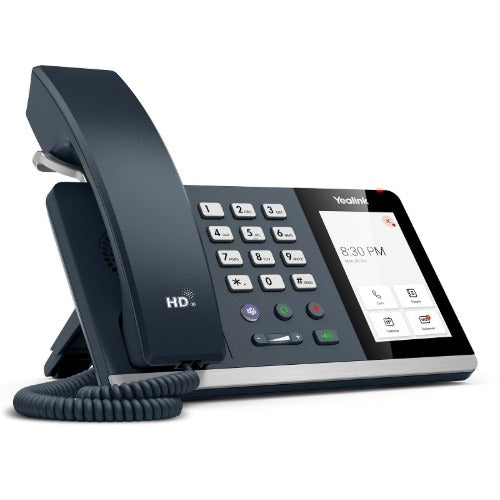
Yealink MP54 E2 Teams Desk Phone
Yealink MP54 E2 Teams Desk Phone
SKU:IPY-MP54-TEAMS-E2
Couldn't load pickup availability
- See our return policy
- 12 months Manufacturer Warranty
Product Information
| Brand | Yealink |
|---|---|
| Category | VOIP Phones |
| SKU | IPY-MP54-TEAMS-E2 |
| Availability | In Stock |

Overview
- The Yealink MP54 E2 is an entry-level Teams desk phone purpose-built for organisations adopting Microsoft Teams as their primary communication platform. With a dedicated Teams button, intuitive Teams-tailored user interface, and seamless integration with Microsoft TAC and YMCS, deployment is straightforward and adoption is fast.
The phone delivers professional-grade HD audio backed by Yealink's Noise Proof Technology, ensuring clear conversations in open office and hybrid environments. The 4-inch capacitive touch screen provides easy access to contacts, call history, and Teams features, while the magnet handset keeps the device organised and ready to use.
Built for modern work, the MP54 E2 supports both Wi-Fi 5 and Gigabit Ethernet connectivity, giving IT teams flexible deployment options. PoE powering eliminates the need for additional power supplies, reducing desk clutter and simplifying installation. The phone is wall-mountable, making it suitable for reception areas, meeting rooms, and individual desks.
Specifications
| Brand | Yealink |
|---|---|
| Model | MP54 E2 |
| Operating System | Android 13 |
| Display | 4-inch capacitive touch screen, 480 x 800 resolution |
| Audio | HD audio with Yealink Noise Proof Technology, magnet handset |
| Connectivity | Dual-band Wi-Fi 5 (2.4GHz/5GHz), Bluetooth 5.2 |
| Network Ports | Dual-port Gigabit Ethernet |
| USB | 1x USB Type A port (supports external headsets) |
| Power Supply | IEEE 802.3af PoE (no PSU required) |
| Microsoft Integration | Dedicated Teams button, Teams-tailored UI, supports Microsoft TAC and YMCS |
| Compatibility | Microsoft Teams, Skype for Business |
| Mounting | Wall-mountable |
| Warranty | 12 months |
Key Features
Ideal For
FAQs
Does the Yealink MP54 E2 require an external power supply?
No. The MP54 E2 is powered via IEEE 802.3af PoE (Power over Ethernet), so no external power supply or PSU is needed. This simplifies installation and reduces desk clutter.
Can I use the MP54 E2 with Skype for Business?
Yes. The MP54 E2 is compatible with both Microsoft Teams and Skype for Business, making it suitable for organisations in the process of upgrading their communications platform.
What connectivity options does the MP54 E2 offer?
The phone includes dual-band Wi-Fi 5 (2.4GHz/5GHz), Bluetooth 5.2, and dual-port Gigabit Ethernet. This gives IT teams flexible deployment options for wired or wireless network integration.
Is the MP54 E2 suitable for wall mounting?
Yes. The MP54 E2 is wall-mountable, making it ideal for reception areas, meeting rooms, or any location where desk space is limited or a mounted installation is preferred.
Can I connect an external headset to the MP54 E2?
Yes. The phone includes a USB Type A port that supports external USB headsets, giving employees flexibility in their audio setup.
What is the screen size and resolution of the MP54 E2?
The MP54 E2 features a 4-inch capacitive touch screen with a resolution of 480 x 800 pixels, providing a clear interface for Teams features and call management.