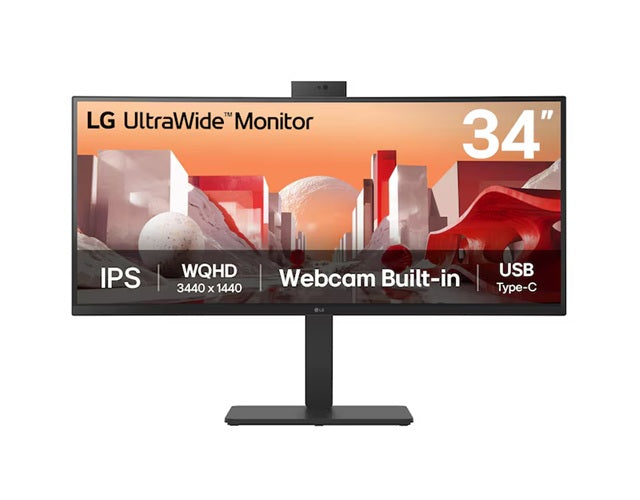
LG 34BA85QE-B UltraWide Curved Monitor
LG 34BA85QE-B UltraWide Curved Monitor
SKU:MNL-34BA85QE-B
Couldn't load pickup availability
- See our return policy
- 36 months Manufacturer Warranty
Product Information
| Brand | LG |
|---|---|
| Category | Monitors |
| SKU | MNL-34BA85QE-B |
| Availability | In Stock |

Overview
- The LG 34BA85QE-B is a premium 34-inch UltraWide curved monitor engineered for professionals who demand screen real estate without sacrificing image quality. The 3440x1440 QHD resolution provides 40% more horizontal space than standard 16:9 displays, whilst the 3800R curved IPS panel delivers 99% sRGB colour accuracy ideal for content creation and design work.
Built-in Full HD webcam, microphone, and speakers eliminate the need for separate peripherals, making it an excellent choice for video conferencing and remote collaboration. The USB-C connection with 90W Power Delivery streamlines your desk setup by charging compatible laptops and devices whilst transferring data, significantly reducing cable management complexity.
Reader Mode and Flicker Safe technology reduce eye strain during extended work sessions, whilst the fully adjustable stand—with height, tilt, and swivel adjustments—ensures ergonomic positioning for any workspace. The 60Hz refresh rate and 5ms response time provide smooth performance for everyday productivity and light multimedia work.
Specifications
| Screen Size | 34 inches |
|---|---|
| Resolution | 3440 x 1440 (QHD UltraWide) |
| Aspect Ratio | 21:09 |
| Panel Type | IPS |
| Curvature | 3800R |
| Colour Gamut | sRGB 99% (CIE1931) |
| Brightness | 300 cd/m² |
| Refresh Rate | 60 Hz |
| Response Time | 5ms (GtG at Faster) |
| HDR Support | HDR10 |
| Connectivity | USB-C with 90W Power Delivery, RJ45 Ethernet |
| Built-in Webcam | Full HD |
| Built-in Audio | Microphone and stereo speakers |
| Display Adjustments | Tilt, Height, Swivel |
| Warranty | 36 months |
Key Features
Ideal For
FAQs
What is the difference between a UltraWide monitor and a standard monitor?
UltraWide monitors have a 21:09 aspect ratio compared to the standard 16:9, providing approximately 40% more horizontal screen space. This makes them ideal for multitasking, side-by-side document editing, and applications like video editing and data analysis without needing multiple displays.
Can I use the USB-C connection to charge my laptop?
Yes. The LG 34BA85QE-B features USB-C with 90W Power Delivery, allowing you to charge compatible laptops and devices whilst using the monitor for display and data transfer. This significantly reduces desktop cable clutter.
Is the built-in webcam suitable for professional video conferencing?
The monitor includes a Full HD (1080p) webcam, which is suitable for most professional video conferencing applications. Combined with the built-in microphone and speakers, it provides an integrated video meeting solution without additional peripherals.
What does 99% sRGB colour accuracy mean for my work?
99% sRGB coverage means the monitor accurately displays colours within the sRGB colour space, making it suitable for content creation, photo editing, and design work where colour consistency and precision are important. It is particularly valuable for professionals working across different media and devices.
How much desk space does a 34-inch UltraWide monitor require?
The 34-inch UltraWide format is wider than a standard monitor but typically requires a single monitor footprint. The adjustable stand (height, tilt, swivel) helps optimise desk positioning. Check the monitor's exact dimensions to ensure it fits your desk setup.
Does the curved design provide practical benefits?
Yes. The 3800R curve brings the edges of the wide display closer to your eyes, improving viewing comfort, reducing the need to move your head across the full width, and providing a more immersive viewing experience, particularly for extended work sessions.
What is Reader Mode and why is it useful?
Reader Mode adjusts the display settings to mimic the appearance and feel of reading from paper, reducing blue light emission and eye strain during extended text-heavy work. Combined with Flicker Safe technology, it enhances viewing comfort throughout the day.