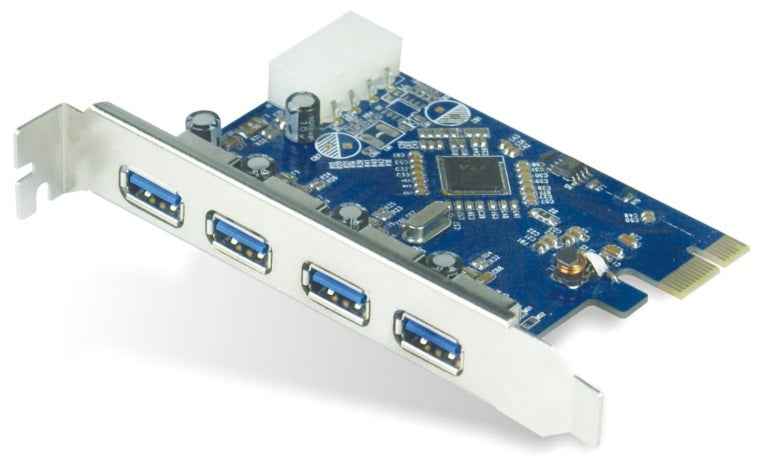
Astrotek 4-Port USB 3.0 PCIe Expansion Card
Astrotek 4-Port USB 3.0 PCIe Expansion Card
SKU:CBAT-U3PCICARD
Couldn't load pickup availability
- See our return policy
- 12 months Manufacturer Warranty
Product Information
| Brand | Astrotek |
|---|---|
| Category | Cables |
| SKU | CBAT-U3PCICARD |
| Availability | In Stock |

Overview
- The Astrotek 4-Port USB 3.0 PCIe Expansion Card provides a straightforward solution for adding high-speed USB connectivity to desktop computers and servers. By utilising a standard PCIe slot, it delivers four external USB 3.0 ports capable of 5 Gbps data transfer, ideal for connecting external storage, printers, and other peripherals without requiring system restarts thanks to hot-swap capability.
Designed with compatibility in mind, the card supports Windows Server 2008 and later, Windows XP, Vista, 7, 8, and 10 operating systems. The Renesas 720201 chipset ensures stable, reliable operation across diverse business environments. Its backward compatibility with USB 2.0 and USB 1.1 devices makes it a practical choice for organisations with mixed device ecosystems.
The full-height bracket and Molex 4-pin power connector ensure secure installation and consistent power delivery. This expansion card is particularly valuable for older systems or specialised workstations where additional USB ports are essential but native motherboard expansion is unavailable.
Specifications
| Interface | PCI Express (PCIe) |
|---|---|
| USB Ports | 4x USB 3.0 Type A Female (external) |
| Data Transfer Rate | 5 Gbps (SuperSpeed) |
| USB Compliance | USB 3.0 with USB 2.0/1.1 backward compatibility |
| Chipset | Renesas 720201 |
| Power Connector | 4-pin Molex |
| Form Factor | Full-height bracket |
| Hot-Swap Support | Yes |
| Operating Systems Supported | Windows Server 2008 and later, Windows XP, Vista, 7, 8, 10 |
| Warranty | 12 months |
Key Features
Ideal For
FAQs
Can I use this card in older desktop computers?
Yes, the Astrotek expansion card works with any desktop featuring an available PCIe slot. It supports Windows XP through Windows 10 and Windows Server 2008 and later, making it compatible with both legacy and modern systems.
Do I need to restart my computer to connect or disconnect USB devices?
No, the hot-swap feature allows you to connect and disconnect USB devices without powering down the system, providing seamless device management.
Will this card work with older USB 2.0 devices?
Yes, the card is fully backward compatible with USB 2.0 and USB 1.1 devices, though they will operate at their native speeds rather than USB 3.0 speeds.
What power source does this card require?
The card connects to the system's PCIe slot for data and uses a 4-pin Molex power connector for additional power stability. Your power supply must have an available Molex connector.
How many USB 3.0 devices can I connect simultaneously?
The card provides four USB 3.0 ports, allowing you to connect up to four USB 3.0 devices simultaneously, subject to bandwidth limitations of the PCIe interface.
Is a driver installation required?
The card comes with a driver CD, though many modern Windows systems provide native USB 3.0 support. Installation may be required for older operating systems.