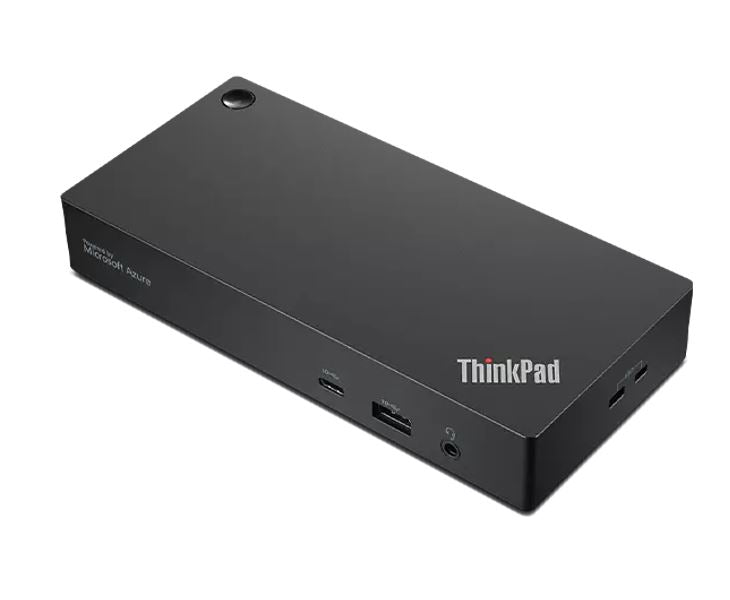
Lenovo ThinkPad Universal USB-C Smart Dock 100W
Lenovo ThinkPad Universal USB-C Smart Dock 100W
SKU:NAL-40B20135AU
The Lenovo ThinkPad Universal USB-C Smart Dock is a multi-port docking station designed for notebook users in mixed-PC environments. Featuring 100W power delivery, triple 4K display support, and five USB ports, it delivers seamless connectivity and charging for hybrid and office-based professionals.
Couldn't load pickup availability
- See our return policy
- CRU (Customer Replaceable Unit) Manufacturer Warranty
Product Information
| Brand | Lenovo |
|---|---|
| Category | Notebook Accessories |
| SKU | NAL-40B20135AU |
| Availability | Out of Stock |

Overview
- The Lenovo ThinkPad Universal USB-C Smart Dock transforms your notebook into a fully connected workstation with a single cable connection. It supports up to three external 4K displays, delivers 100W power delivery for rapid charging, and provides comprehensive connectivity through multiple USB, Ethernet, and audio ports.
Designed for flexibility, this dock works with any USB-C equipped notebook in mixed operating environments. It features automatic firmware updates via Microsoft Azure Sphere, ensuring your dock remains secure and up to date without manual intervention. The inclusion of dual DisplayPort and HDMI outputs gives you maximum display flexibility for productivity-focused workflows.
With five USB ports, Gigabit Ethernet, and a 3.75mm audio jack, the dock consolidates all essential connections into one compact device. The 340g form factor makes it suitable for both fixed desk setups and mobile professionals who dock regularly. Three-year warranty coverage provides peace of mind for business-critical deployments.
Specifications
| Brand | ThinkPad |
|---|---|
| Model | ThinkPad Universal USB-C Smart Dock |
| Colour | Black |
| Weight | 340 g |
| Packed Weight | 955 g |
| Dimensions (L x D x H) | 171 x 80 x 30.75 mm |
| Packed Dimensions (L x D x H) | 210 x 158 x 75 mm |
| USB Ports | 3x USB 3.2 Gen 2, 2x USB 2.0, 1x USB-C |
| Video Ports | 2x DisplayPort, 1x HDMI |
| Audio Port | 1x Combo Audio Jack (3.75mm) |
| Ethernet | 1x Gigabit Ethernet (RJ45) |
| Maximum External Monitors | 3 |
| Monitor Resolution Support | 2x 3840x2160 @60Hz, 1x 3840x2160 @30Hz |
| Power Delivery | 100W (with 135W adapter); 65W (with 90W adapter) |
| Input Power | 90W |
| Charging Port | DC-IN |
| AC Plug Type | Slim-tip |
| Power Button | Yes |
| Security Features | 2x Security lock slot |
| Operating Temperature Range | 0°C to 35°C |
| Relative Humidity Range | 20% to 95% (no condensation) |
| OS Compatibility | Windows 11, Windows 10, Windows 7 |
| Driver Required | Yes |
| Warranty Period | Three Years (36 months) |
| Warranty Type | CRU (Customer Replaceable Unit) |
| Agency Approvals | FCC, ICES, CE, KCC, RCM, BSMI, VCCI, CB, cULus, EAC, TÜV, Serbia Kvalitet, Israel SII, Ukraine DoC, NOM |
| Package Contents | ThinkPad Universal USB-C Dock, 90W AC Power Adapter, Power Cord, Documentation |
Key Features
Ideal For
FAQs
What USB-C notebooks can this dock work with?
The ThinkPad Universal USB-C Smart Dock is compatible with any USB-C equipped notebook, including Lenovo ThinkPad and other brands' devices. It works with Windows 7, Windows 10, and Windows 11 systems.
How many monitors can I connect, and what resolution is supported?
You can connect up to three external monitors. The dock supports 4K resolution (3840x2160) on two displays at 60Hz and one display at 30Hz through 2x DisplayPort and 1x HDMI.
What is the maximum power delivery for laptop charging?
The dock delivers 65W power with the included 90W adapter. For 100W power delivery, an optional 135W slim-tip power adapter is required, available separately.
What security features are included?
The dock includes two security lock slots for cable management and automatic firmware updates via Microsoft Azure Sphere to ensure security patches are applied without manual intervention.
What warranty does this dock come with?
The ThinkPad Universal USB-C Smart Dock includes a three-year (36-month) warranty under Lenovo's CRU (Customer Replaceable Unit) program.
Is a driver installation required?
Yes, a driver is required for full functionality. Drivers are available from Lenovo's support website and can be installed on Windows systems.
Can this dock be used in hot or humid environments?
The dock operates reliably in environments with temperatures from 0°C to 35°C and humidity levels from 20% to 95% (without condensation).
What is included in the box?
The package includes the ThinkPad Universal USB-C Dock, 90W AC power adapter, power cord, and documentation.