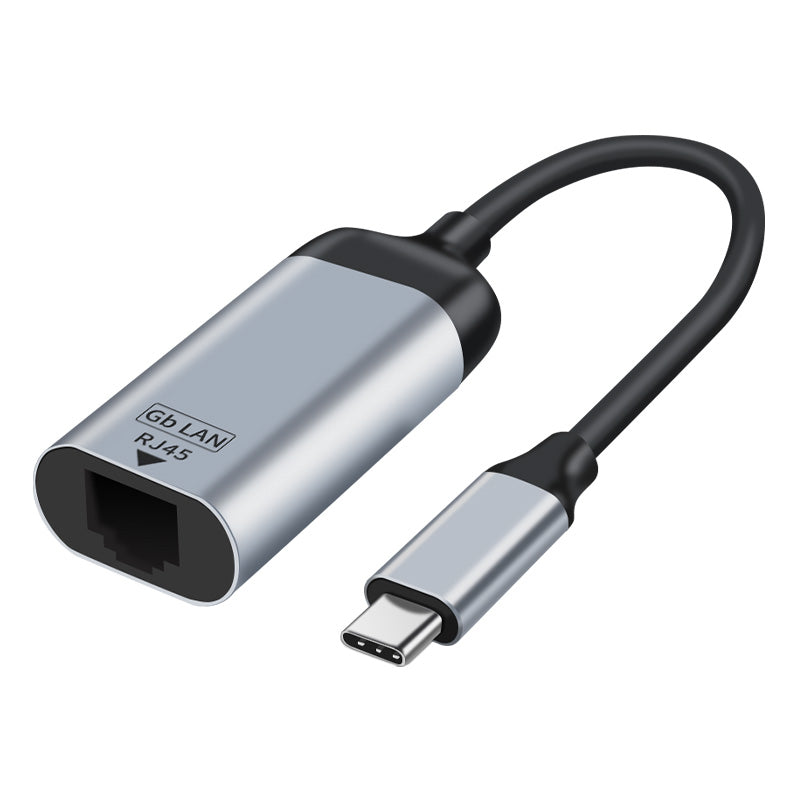
Astrotek USB-C to RJ45 Gigabit Ethernet Adapter 15cm
Astrotek USB-C to RJ45 Gigabit Ethernet Adapter 15cm
SKU:CBAT-USBCRJ45-MF15
The Astrotek AT-USBCRJ45-MF15 is a USB-C to RJ45 Gigabit Ethernet adapter designed for laptops and tablets. Featuring plug-and-play connectivity, 1000 Mbps speeds, and backward compatibility with 10/100 Mbps networks, it delivers reliable wired connectivity for devices without built-in Ethernet ports.
Couldn't load pickup availability
- See our return policy
- 12 months Manufacturer Warranty
Product Information
| Brand | Astrotek |
|---|---|
| Category | Cables |
| SKU | CBAT-USBCRJ45-MF15 |
| Availability | In Stock |

Overview
- The Astrotek USB-C to RJ45 Gigabit Ethernet Adapter provides instant wired network connectivity for modern laptops, tablets, and ultrabooks equipped with USB-C ports. Simply plug into your device's USB-C port and connect to any standard Ethernet cable—no drivers or installation required.
Designed for professionals who need reliable, high-speed wired connectivity, this adapter supports Gigabit Ethernet speeds up to 1000 Mbps while remaining backward compatible with legacy 10/100 Mbps networks. The shielded cable and gold-plated connectors ensure consistent performance and reduce electromagnetic interference.
With broad operating system support including macOS, Windows, Linux, and Android, the Astrotek adapter is a practical solution for any device with a USB-C port. Whether you're working from a corporate office, co-working space, or home office, this adapter eliminates buffering and latency issues associated with WiFi connectivity.
Specifications
| Connector Type (Input) | USB-C Male |
|---|---|
| Connector Type (Output) | RJ45 Female |
| Cable Length | 15 cm |
| Maximum Speed | 1000 Mbps (Gigabit Ethernet) |
| Backward Compatibility | 10/100 Mbps Ethernet |
| Cable Shield | Shielded |
| Construction Material | Aluminium shell with gold-plated connectors |
| Colour | Black |
| Installation | Plug and play, no drivers required |
| Supported Operating Systems | macOS (OS X 10.2+), Windows (8/7/Vista/XP), Linux, Android |
| Warranty | 12 months |
Key Features
Ideal For
FAQs
Do I need to install drivers for this USB-C Ethernet adapter?
No, the Astrotek adapter is plug and play. It works immediately upon connection to your USB-C port with no driver installation or configuration required.
What is the maximum Ethernet speed this adapter supports?
This adapter supports Gigabit Ethernet speeds up to 1000 Mbps. It is also backward compatible with 10/100 Mbps Ethernet networks.
Which devices is this adapter compatible with?
Any device with a USB-C port, including MacBook Air, MacBook Pro, iPad Pro, Dell XPS, Microsoft Surface, HP laptops, Lenovo ThinkPads, and ASUS laptops. It supports macOS, Windows, Linux, and Android.
Is the cable long enough to reach my modem or switch?
The adapter includes a 15 cm shielded cable. This is typically sufficient for connecting to a modem or network switch nearby. For longer distances, you can disconnect the adapter and use a standard Ethernet cable.
Can I use this adapter with an iPad Pro?
Yes, if your iPad Pro is equipped with USB-C (iPad Pro 11" and 12.9" models from 2018 onwards), this adapter will work. Simply connect it to your device's USB-C port.
Will this adapter work with WiFi hotspots or do I need an active Ethernet connection?
This adapter requires a physical Ethernet cable connection to a network switch, modem, or router. It cannot connect to WiFi networks.
Is the connection shielded to prevent interference?
Yes, the 15 cm cable is shielded to reduce electromagnetic interference and ensure stable, reliable network connectivity.