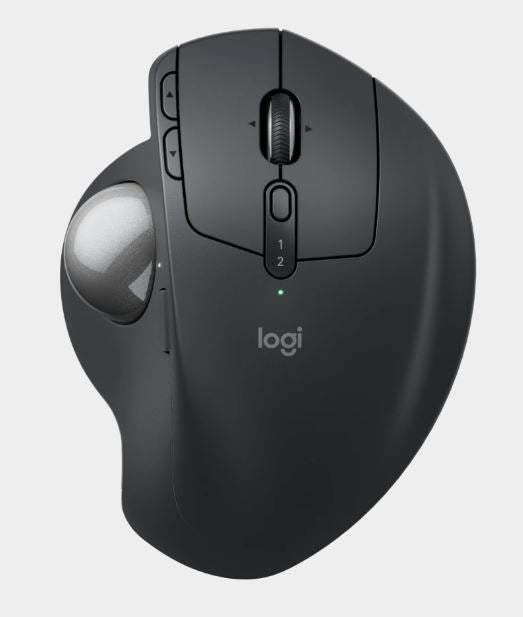
Logitech MX Ergo S SILENT Wireless Ergonomic Trackball
Logitech MX Ergo S SILENT Wireless Ergonomic Trackball
SKU:MILT-MXERGO-S
The Logitech MX Ergo S SILENT is an advanced wireless ergonomic trackball designed for professionals seeking comfort and precision. Featuring a 20-degree tilt angle, quiet clicks, six customisable buttons, and fast USB-C charging, it delivers extended battery life and reduced fatigue for knowledge workers.
Couldn't load pickup availability
- See our return policy
- 12 months Manufacturer Warranty
Product Information
| Brand | Logitech |
|---|---|
| Category | Mouse |
| SKU | MILT-MXERGO-S |
| Availability | In Stock |

Overview
- The Logitech MX Ergo S SILENT represents the latest advancement in ergonomic trackball technology. Unlike traditional mice, the MX Ergo S places the ball within reach of your fingers, allowing your arm to rest in a natural position. The 20-degree tilt angle further reduces strain on your wrist and forearm, making it an excellent choice for professionals who spend extended periods at a computer.
Quiet operation is a standout feature. All eight buttons, including left and right clicks, employ silent mechanical switches—ideal for open offices and shared workspaces where noise reduction matters. The silent design doesn't compromise responsiveness or feel.
Battery performance is exceptional. A single full charge delivers up to 120 days of typical use, with an emergency one-minute quick charge providing 24 hours of operation. USB-C charging is convenient and future-proof, though the cable must be purchased separately.
Connectivity options include both Logi Bolt USB Receiver and Bluetooth Low Energy, giving you flexibility to switch between devices or maintain a wireless range of up to 10 metres. The Logi Options+ app enables full button customisation on Windows and macOS, allowing you to tailor the device to your workflow.
Specifications
| Brand | Logitech |
|---|---|
| Model | MX Ergo S SILENT |
| Product Type | Wireless Ergonomic Trackball |
| Connection Type | Logi Bolt USB Receiver, Bluetooth Low Energy Technology |
| Wireless Range | 10 metres (33 feet) |
| Sensor Technology | Logitech Advanced Optical Tracking |
| DPI Range | 512–2048 DPI (adjustable) |
| Total Buttons | 8 (left/right click, back/forward, scroll wheel with tilt, middle click, precision mode, easy-switch) |
| Customisable Buttons | 6 |
| Button Type | Silent mechanical switches (all buttons) |
| Battery Type | Rechargeable (USB-C charging) |
| Battery Life | Up to 120 days on a single full charge |
| Quick Charge | 1 minute charge provides 24 hours of use |
| Charging Cable | Not included (USB-C cable available for purchase) |
| Customisation Software | Logi Options+ (Windows and macOS) |
| Height | 132.5 mm |
| Width | 99.8 mm |
| Depth | 51.4 mm |
| Weight (without metal plate) | 164 g |
| Weight (with metal plate) | 259 g |
| Warranty | 12 months |
Key Features
Ideal For
FAQs
What is the advantage of a trackball over a traditional mouse?
A trackball keeps your hand and wrist in a stationary position while you control cursor movement with your fingers. This reduces strain on your wrist, forearm, and shoulder—particularly beneficial for users prone to repetitive strain injury (RSI). The MX Ergo S's 20-degree tilt further promotes a natural arm position.
Are the quiet buttons less responsive than standard mouse buttons?
No. The MX Ergo S SILENT uses advanced silent mechanical switches that maintain full responsiveness and tactile feedback while dramatically reducing noise. All eight buttons, including left and right clicks, employ silent technology.
How long does the battery actually last in real-world use?
Logitech rates the MX Ergo S at up to 120 days on a single charge under typical use. Actual battery life depends on usage patterns, wireless technology (Bluetooth vs. Logi Bolt), and customisation settings. The quick-charge feature also ensures you can get 24 hours of use from just one minute of charging.
Is the USB-C charging cable included?
No. The cable is not included in the box. You can purchase a USB-C cable separately from Logitech's website (logi.com) or use any standard USB-C cable you already own.
Can I customise the buttons, and how?
Yes. Six of the eight buttons are fully customisable via the Logi Options+ app, available for Windows and macOS. The app allows you to remap buttons for specific applications or workflows, boosting productivity.
Does it work with both Windows and macOS?
Yes. The MX Ergo S SILENT works with recent versions of Windows and macOS. Button customisation requires the Logi Options+ app, available free at logi.com/optionsplus.
Can I use both the Logi Bolt USB Receiver and Bluetooth at the same time?
The MX Ergo S SILENT supports both connection technologies, allowing you to switch between them. However, you would typically use one connection method at a time depending on your needs and device compatibility.