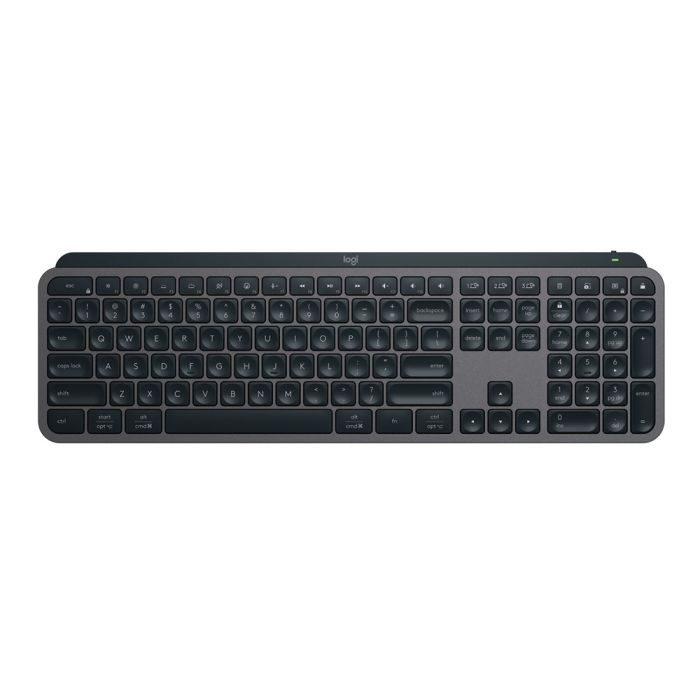
Logitech MX KEYS S Wireless Illuminated Keyboard Graphite
Logitech MX KEYS S Wireless Illuminated Keyboard Graphite
SKU:KBLT-MXKEYS-GRAPHITE
The Logitech MX KEYS S is a wireless illuminated keyboard designed for professionals who need seamless multi-device connectivity. Featuring smart backlighting, Easy-Switch technology, and up to 10 days battery life, it delivers premium typing performance for power users and business environments.
Couldn't load pickup availability
- See our return policy
- 1-Year Limited Hardware Warranty Manufacturer Warranty
Product Information
| Brand | Logitech |
|---|---|
| Category | Keyboards |
| SKU | KBLT-MXKEYS-GRAPHITE |
| Availability | In Stock |

Overview
- The Logitech MX KEYS S is a premium wireless keyboard engineered for professionals who demand precision, connectivity, and durability. Its intelligent backlighting system automatically adjusts to your environment, while Easy-Switch keys enable instant switching between up to three connected devices—ideal for professionals juggling multiple computers throughout the day.
Battery efficiency is exceptional, delivering up to 10 days of use on a full charge with backlighting enabled, or five months with backlighting disabled. The rechargeable Li-Po battery charges via USB-C, eliminating the need for disposable batteries. Connectivity is flexible, supporting both Bluetooth Low Energy and the dedicated Logi Bolt USB Receiver for users requiring maximum stability and security.
Built with a low-carbon aluminium case and housed in FSC-certified paper packaging, the MX KEYS S reflects Logitech's commitment to sustainability whilst maintaining professional-grade build quality. It integrates seamlessly with Logitech Flow enabled mice and supports the optional Logi Options+ customization app, giving users full control over keyboard behaviour and shortcuts.
Specifications
| Keyboard Dimensions | 430.2 mm (W) × 131.63 mm (H) × 20.5 mm (D) |
|---|---|
| Keyboard Weight | 810 g |
| Battery Type | Rechargeable Li-Po (1500 mAh) |
| Battery Life | Up to 10 days with backlighting enabled; up to 5 months with backlighting off |
| Charging | USB-C rechargeable |
| Connectivity | Bluetooth Low Energy or Logi Bolt USB Receiver |
| Wireless Range | 10 metres |
| Simultaneous Device Connections | Up to 3 devices via Easy-Switch technology |
| Backlighting | Smart illumination with hand proximity sensor and ambient light sensor adjustment |
| Indicator Lights | Caps Lock and Battery status |
| Power Switch | On/Off toggle |
| Logi Bolt USB Receiver Dimensions | 14.4 mm (W) × 18.4 mm (H) × 6.6 mm (D) |
| Logi Bolt USB Receiver Weight | 2 g |
| Compatible Ecosystems | Windows and macOS |
| Optional Software | Logi Options+ (Windows and macOS) |
| Case Material | Low-carbon aluminium |
| Packaging | FSC-certified paper |
| Sustainability | Certified carbon neutral |
| Warranty | 1-Year Limited Hardware Warranty |
| Color | Graphite |
Key Features
Ideal For
FAQs
How long does the battery last on a single charge?
The MX KEYS S delivers up to 10 days of battery life with backlighting enabled under typical use conditions. With backlighting turned off, battery life extends to approximately 5 months. Actual battery life may vary depending on your typing habits and computing environment.
Can I connect the keyboard to multiple devices at once?
Yes. The Easy-Switch keys allow you to connect up to three devices simultaneously via Bluetooth Low Energy or the Logi Bolt USB Receiver. You can switch between connected devices instantly by pressing the Easy-Switch buttons.
What is the difference between Bluetooth and the Logi Bolt USB Receiver?
Both offer wireless connectivity at 10 metres range. Bluetooth Low Energy is convenient for multi-device switching, whilst the Logi Bolt USB Receiver provides a dedicated, encrypted connection ideal for security-conscious environments. The Logi Bolt receiver is also recommended if you use FileVault encryption on macOS.
How does the backlighting work?
The MX KEYS S features smart backlighting with two sensors. Hand proximity sensors detect when your hands approach the keyboard and turn the lights on automatically. Ambient light sensors adjust the brightness based on your environment, ensuring optimal visibility without draining the battery.
Is the keyboard compatible with Mac and Windows?
Yes. The MX KEYS S works with both macOS and Windows computers via Bluetooth Low Energy or the Logi Bolt USB Receiver. The optional Logi Options+ customization app is available for both operating systems.
How do I charge the keyboard?
The MX KEYS S charges via USB-C. Simply connect a USB-C cable to the charging port. A full charge typically takes a few hours and provides up to 10 days of use with backlighting enabled.
Can I use this keyboard with a Logitech Flow mouse?
Yes. The MX KEYS S is compatible with Logitech Flow enabled mice, allowing seamless control across multiple devices. This integration simplifies multi-device workflows for professionals.
What warranty does this keyboard include?
The Logitech MX KEYS S includes a 1-Year Limited Hardware Warranty covering manufacturing defects.