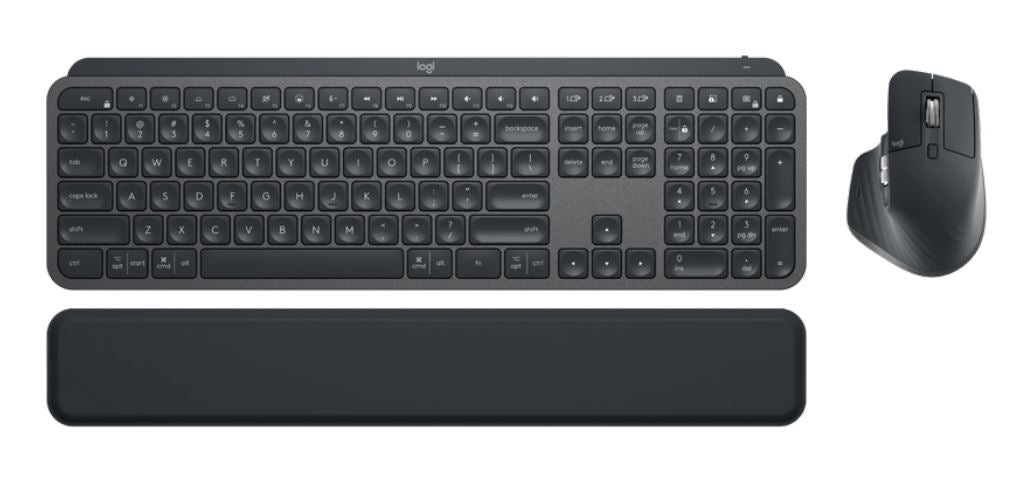
Logitech MX Keys Combo for Business Gen 2
Logitech MX Keys Combo for Business Gen 2
SKU:KBLT-MXKEYS_COMBO-G2
Couldn't load pickup availability
- See our return policy
- 2-year hardware limited warranty Manufacturer Warranty
Product Information
| Brand | Logitech |
|---|---|
| Category | Keyboards |
| SKU | KBLT-MXKEYS_COMBO-G2 |
| Availability | In Stock |

Overview
- The Logitech MX Keys Combo for Business Gen 2 is a premium wireless keyboard and mouse solution purpose-built for business environments. This combo pairs the MX Keys for Business keyboard with the MX Master 3S for Business mouse and a palm rest, delivering a complete, ergonomic workspace setup.
Designed for professionals who work across multiple devices, the Easy-Switch feature allows seamless switching between up to 3 connected devices via Logi Bolt or Bluetooth. The keyboard features Perfect Stroke scissor keys optimised for typing comfort and precision, whilst the mouse's 8000 DPI sensor performs on virtually any surface with minimal noise thanks to Quiet Click technology.
Battery efficiency is a key strength: the keyboard delivers 10 days of use per charge, and the mouse an impressive 70 days, reducing the need for constant recharging. Both devices feature on-device battery indicators. With full-size layout, backlit keys, and a robust 2-year warranty, this combo is ideal for corporate teams, remote workers, and IT departments seeking reliable, long-lasting peripherals that enhance productivity without compromise.
Specifications
| Brand | Logitech |
|---|---|
| Model | MX Keys Combo for Business Gen 2 |
| Product Type | Wireless Keyboard and Mouse Combo |
| Keyboard Model | MX Keys for Business |
| Mouse Model | MX Master 3S for Business |
| Wireless Connectivity | Logi Bolt, Bluetooth |
| Wireless Range | 10 metres |
| Keyboard Size | Full-size |
| Number of Keys | 108 |
| Key Type | Perfect Stroke scissor |
| Number Pad | Yes (10-key) |
| Backlit Keys | Yes |
| Illuminated Caps Lock | Yes |
| Easy-Switch Channels | 3 devices |
| Mouse DPI | 8000 |
| Mouse Tracking | Any-surface |
| Mouse Click Technology | Quiet Click |
| Keyboard Battery | USB-C rechargeable Li-Po (1500 mAh); 10 days per charge |
| Mouse Battery | USB-C rechargeable Li-Po (500 mAh); 70 days per charge |
| Battery Indicators | Yes (keyboard and mouse) |
| Service Life | 10 million keystrokes/clicks |
| Reliability (MTTF) | Greater than 150,000 hours |
| Warranty | 2-year hardware limited warranty |
| Certifications | Global (list available upon request) |
Key Features
Ideal For
FAQs
What is Easy-Switch and how does it work?
Easy-Switch allows the keyboard and mouse to connect simultaneously to up to 3 different devices via Logi Bolt or Bluetooth. You can seamlessly switch between devices with a button press, making it ideal for professionals managing multiple computers, tablets, or phones.
How long do the batteries last?
The keyboard battery lasts approximately 10 days on a full charge, whilst the mouse battery lasts around 70 days. Both devices feature USB-C charging and on-device battery indicators to keep you informed of remaining charge.
Does the combo include a mouse pad?
The combo includes the MX Keys for Business keyboard, MX Master 3S for Business mouse, and an MX Palm Rest for ergonomic support. A mouse pad is not included; however, the 8000 DPI sensor works on virtually any surface.
What is Quiet Click technology?
Quiet Click technology reduces the noise produced during mouse clicks, making the device suitable for quiet office environments, open workspaces, and shared spaces without disturbing colleagues.
Is this combo compatible with Mac and Windows?
Yes, the Logitech MX Keys Combo for Business Gen 2 is compatible with both Mac and Windows systems via Logi Bolt or Bluetooth connectivity. It supports Easy-Switch across multiple operating systems.
What warranty and support is provided?
The combo comes with a 2-year hardware limited warranty. Logitech's Mean Time To Failure (MTTF) reliability rating exceeds 150,000 hours, ensuring long-term durability in business environments. Global certifications are available upon request.
Can I use the keyboard and mouse separately?
Yes, both the keyboard and mouse can be used independently. They pair together as a combo for convenience but function as standalone devices if needed.