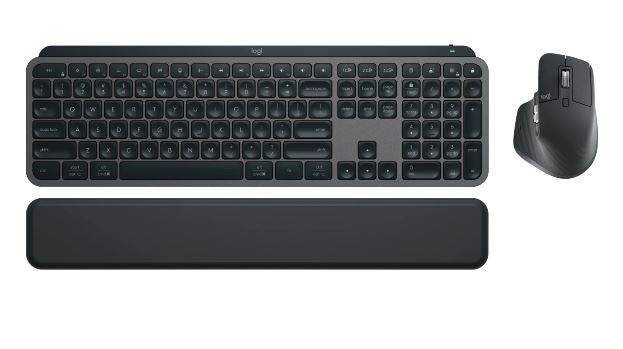
Logitech MX KEYS S COMBO Wireless Keyboard and Mouse
Logitech MX KEYS S COMBO Wireless Keyboard and Mouse
SKU:KBLT-MX_KEYS_COMBO
The Logitech MX KEYS S COMBO is a wireless keyboard and mouse combo designed for professionals who demand speed and precision. Featuring illuminated scissor keys, an 8000 DPI track-anywhere sensor, and multi-device connectivity, it delivers all-day comfort and seamless workflow for creative and business users.
Couldn't load pickup availability
- See our return policy
- 12 months Manufacturer Warranty
Product Information
| Brand | Logitech |
|---|---|
| Category | Keyboards |
| SKU | KBLT-MX_KEYS_COMBO |
| Availability | In Stock |

Overview
- The Logitech MX KEYS S COMBO pairs the MX Keys S keyboard with the MX Master 3S mouse and an ergonomic palm rest to create a complete, high-performance input solution. Designed for professionals who work across multiple devices, this combo delivers comfort, stability, and precision in a seamlessly integrated package.
The MX Keys S features illuminated scissor keys with perfect stroke response and customisable function keys, while the MX Master 3S mouse offers an 8000 DPI track-anywhere sensor for accurate control on any surface. Both devices support simultaneous connection to up to 3 devices via Bluetooth or the included Logi Bolt USB receiver, making it ideal for professionals juggling multiple screens or work systems.
With 10 days of battery life per charge (with backlighting enabled) and compatibility across Windows, macOS, iPadOS, ChromeOS, and Linux, this combo adapts to your workflow rather than the other way around. The Logi Options+ software unlocks advanced customisation options, allowing you to personalise keys, gestures, and shortcuts to match your unique productivity needs.
This is an investment in daily comfort and efficiency—ideal for creative professionals, developers, IT managers, and knowledge workers who spend significant time at their desks.
Specifications
| Brand | Logitech |
|---|---|
| Model | MX KEYS S COMBO |
| Manufacturer SKU | 920-011605 |
| Included Components | MX Keys S keyboard, MX Master 3S mouse, MX Palm Rest |
| Keyboard Type | Membrane with scissor keys |
| Key Features | Illuminated, customisable Fn-row |
| Mouse Sensor | Track Anywhere, 8000 DPI |
| Connectivity | Bluetooth and Logi Bolt USB receiver (included) |
| Multi-Device Support | Up to 3 devices with easy switching |
| Battery Life (Keyboard) | 10 days per charge with backlighting; 5 months without backlighting |
| Charging | USB-C to USB-A |
| Compatible Operating Systems | Windows, macOS, iPadOS, ChromeOS, Linux |
| Software | Logi Options+ compatible |
| Colour | Graphite |
| Warranty | 12 months |
| Sustainability | Post-Consumer Recycled (PCR) plastic; FSC-certified; no plastic packaging |
| Additional Benefits | Includes complimentary 1-month Adobe Creative Cloud membership (eligible countries only) |
Key Features
Ideal For
FAQs
Can I use the MX KEYS S COMBO with multiple devices?
Yes. Both the keyboard and mouse support Bluetooth connectivity and can be paired with up to 3 devices simultaneously. You can easily switch between devices using dedicated controls, making it ideal for multi-device workflows.
What is included in the MX KEYS S COMBO?
The combo includes the MX Keys S keyboard, MX Master 3S mouse, MX Palm Rest, and the Logi Bolt USB receiver for wireless connectivity. No additional components are required to get started.
How long does the battery last on the keyboard?
The MX Keys S keyboard provides 10 days of battery life per charge with backlighting enabled, or approximately 5 months without backlighting. Actual battery life may vary depending on usage patterns.
Which operating systems are compatible?
The MX KEYS S COMBO is compatible with Windows, macOS, iPadOS, ChromeOS, and Linux, making it suitable for a wide range of professional workflows and environments.
What is the DPI rating on the mouse?
The MX Master 3S mouse features an 8000 DPI track-anywhere sensor, providing precise cursor control and the ability to operate on virtually any surface without a mousepad.
Is Logi Options+ software included?
Logi Options+ is compatible with the MX KEYS S COMBO and available as a free download. This software allows you to customise keys, shortcuts, gestures, and other advanced settings to enhance your productivity.
How do I charge the devices?
Both the keyboard and mouse charge via USB-C to USB-A cable. A single charge provides extended battery life, reducing the need for frequent charging.
Is a palm rest included?
Yes. The MX Palm Rest is included with the combo, providing ergonomic support during extended work sessions and helping reduce strain during long typing periods.