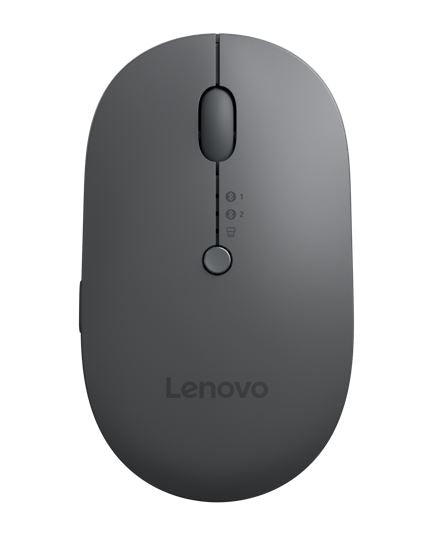
Lenovo X9 Edition Multi-Device Wireless Mouse
Lenovo X9 Edition Multi-Device Wireless Mouse
SKU:NAL-4Y51R29290
The Lenovo X9 Edition is a multi-device wireless mouse designed for professionals who need seamless connectivity across multiple devices. Featuring Bluetooth 5.0 and USB-C connectivity, up to three months battery life, and a programmable AI Now button, it delivers flexibility and productivity for modern workplaces.
Couldn't load pickup availability
- See our return policy
- 12 months Manufacturer Warranty
Product Information
| Brand | Lenovo |
|---|---|
| Category | Mouse |
| SKU | NAL-4Y51R29290 |
| Availability | In Stock |

Overview
- The Lenovo X9 Edition Multi-Device Wireless Mouse is engineered for professionals who work across multiple computers, tablets, and devices. Unlike traditional single-device mice, it maintains active connections to up to three devices simultaneously, allowing you to switch between them instantly with a dedicated button—eliminating the need for multiple mice or constant re-pairing.
Battery performance sets this mouse apart. A full charge via USB-C or Qi wireless charging delivers up to three months of use with lights off, and a quick 15-minute charge provides a week of operation. The rechargeable 4.2V lithium battery is built for endurance, with a 3 million-press button lifecycle ensuring durability in demanding office environments.
The programmable AI Now button represents Lenovo's forward-thinking design, allowing you to launch AI applications with a single click. When paired with Lenovo Accessories and Display Manager software, this button becomes fully customisable, adapting to your specific workflow requirements. The ambidextrous design, 2-way scroll wheel, and 2,400 DPI optical sensor provide the precision and comfort expected in professional-grade peripherals.
Built to strict international standards including CB, cTUVus, CE, RoHS, and FCC certification, this mouse is suitable for global business environments and meets Australian regulatory requirements.
Specifications
| Brand | Lenovo |
|---|---|
| Model | X9 Edition |
| Product Type | Multi-Device Wireless Mouse |
| Connectivity | Bluetooth 5.0 (2 devices) + USB-C dongle (1 device) |
| Sensor Type | Blue Optical |
| Maximum DPI | 2,400 DPI |
| Buttons | 5 buttons with programmable AI Now trigger |
| Scroll Wheel | 2-way scroll wheel (up/down) |
| Battery Type | Rechargeable 4.2V lithium battery |
| Battery Life | Up to 3 months with lights off |
| Charging Time | 2 hours full charge; 15 minutes for 1 week use |
| Charging Methods | USB-C wired or Qi wireless |
| Charging Cable | USB-C to USB-C, 50 cm length |
| Design | Ambidextrous |
| Weight | 75 g (mouse only) |
| Button Lifecycle | 3 million presses |
| Operating System | Windows 10, Windows 11 |
| Software | Lenovo Accessories and Display Manager (LADM) |
| Operating Temperature | 0°C to 40°C |
| Relative Humidity | 20% to 95% |
| Colour | Thunder grey top with thunder black bottom |
| Package Dimensions | 80 x 51 x 109 mm |
| Package Weight | 135 g |
| Warranty | 12 months |
Key Features
Ideal For
FAQs
Can I use this mouse with non-Lenovo computers?
Yes, the X9 Edition works with any Windows 10 or Windows 11 computer with USB-C ports or Bluetooth 5.0 capability. While Lenovo Accessories and Display Manager software enables full programmability features, the mouse functions as a standard wireless mouse on compatible devices.
How long does the battery actually last in real-world use?
The manufacturer rates up to 3 months with lights off and typical daily use. A 15-minute rapid charge provides approximately one week of operation, allowing flexible power management for professionals on the move.
How do I switch between the three paired devices?
The dedicated quick-switch button on the mouse allows you to cycle control between your three paired devices instantly. No re-pairing or driver changes are required—simply press the button to move to the next device.
Is Qi wireless charging reliable, or should I use the USB-C cable?
Both charging methods are equally reliable. Qi wireless charging is convenient for desk-based use, while USB-C cable charging is faster and more portable. The choice depends on your workspace and preference.
What does the programmable AI Now button do?
By default, it launches AI applications on compatible systems. When Lenovo Accessories and Display Manager software is installed, the button becomes fully programmable, allowing you to customise it for specific workflows or applications.
Is this mouse suitable for left-handed users?
Yes, the X9 Edition features an ambidextrous design suitable for both left and right-handed users, with intuitive button placement accessible from either side.
What compliance and safety certifications does this mouse hold?
The X9 Edition holds multiple international certifications including CB, cTUVus, CE, RoHS, FCC, and Qi wireless charging certification, ensuring it meets Australian and global safety and regulatory standards.